By the tiswa editorial team, from the official sources listed at the end of this guide. How we write our guides
Nine days have passed since you wrote to a training provider and nobody has replied. You reread your message. The subject says “Request”, the CV is attached as “Final2”, and the email spends two paragraphs on enthusiasm before saying what you actually want. Someone opening dozens of emails that morning found nothing to answer and moved on. The mistake is common, and five small habits fix it.
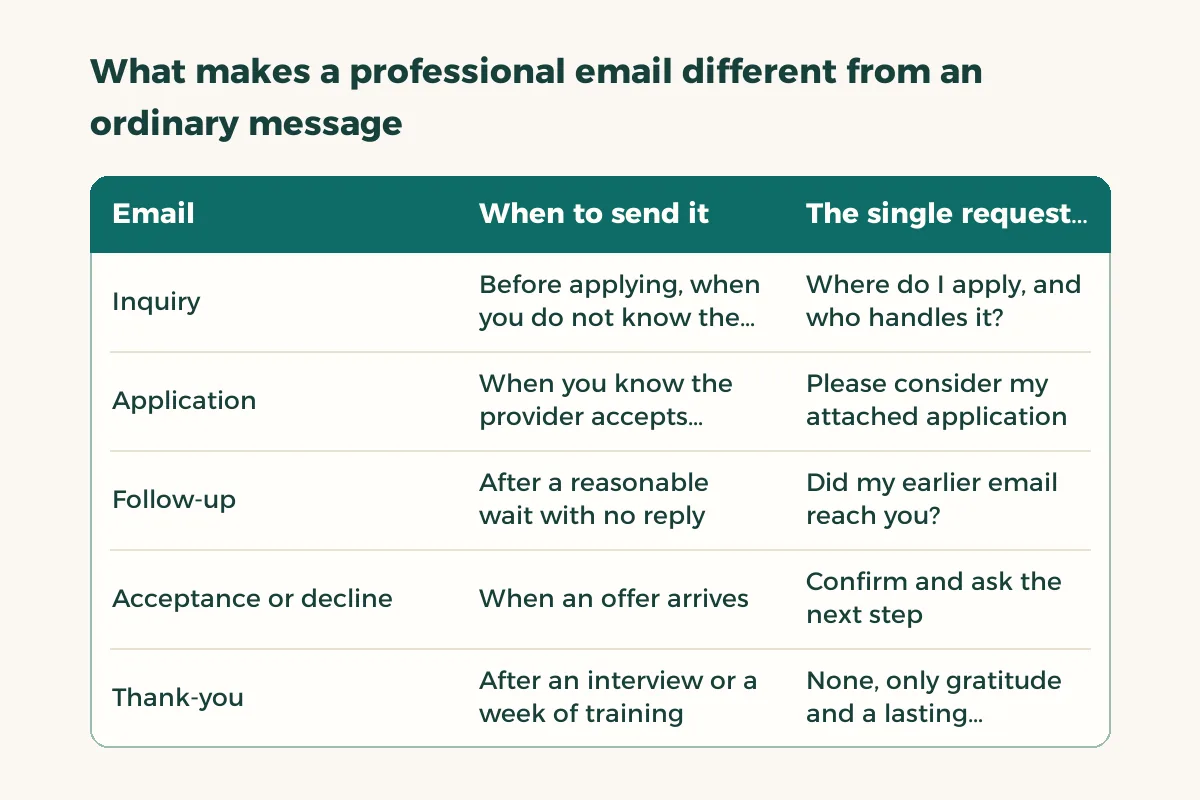
What makes a professional email different from an ordinary message?
A professional email is read by someone busy who does not know you. It therefore carries four things in order: a subject that says what it is, a greeting that uses the person’s title, a request in two lines and a signature that identifies you. Longer detail belongs in the attachment. Standard business writing guidance follows the same order: a clear purpose up front, a concise body and a close that names the next step.1
Professional does not mean stiff. A sentence like “I have the honour to humbly submit” weighs the message down without adding respect. Use short direct sentences, keep the formal greeting at the start and the sign-off at the end, and leave the middle plain.
| When to send it | The single request in it | |
|---|---|---|
| Inquiry | Before applying, when you do not know the process or the contact | Where do I apply, and who handles it? |
| Application | When you know the provider accepts requests | Please consider my attached application |
| Follow-up | After a reasonable wait with no reply | Did my earlier email reach you? |
| Acceptance or decline | When an offer arrives | Confirm and ask the next step |
| Thank-you | After an interview or a week of training | None, only gratitude and a lasting connection |
How do you write a subject line the reader opens?
The subject line is the only sentence read before the reader decides whether to open the email. Give it three parts: the purpose, your name and your major. “Co-op training request, Sara Alotaibi, Computer Science” beats “Request” by a long way. If the provider’s advert specifies a subject format, copy it exactly, because their sorting may depend on it.
Avoid all capitals, exclamation marks and the word “urgent” unless it truly is. What feels like urgency from your side reads as pressure on theirs.
How do you write a professional email step by step?
- Decide the request before you type
On a side note write one sentence: what do I want this person to do after reading? If you end up with two sentences, you have two emails.
- Find the recipient’s name and role
Check the provider’s site or the advert. A generic greeting works when no name exists, but a name is stronger, and if you cannot find it, ask rather than guess.
- Open with one line that introduces you
Name, major, university and year in a single sentence, then the purpose straight away.
- Give one piece of evidence
One project, course or skill that links you to what you ask for, instead of a list of general qualities.
- Name the attachment and attach it
File name: “Your name - CV - your major”. After attaching, open the file from inside the draft to confirm it is the right one.
- Sign in full
Name, major, university, a phone number you answer, and a link to your professional profile if you have one.
- Read it aloud
The eye skips mistakes and the ear catches them. Then send, or schedule the send for the next morning if you wrote it late.2

What do the five editable example emails look like?
These are examples to adapt, not official wording for any provider. Change what sits between the brackets, delete what does not apply and let the provider’s instructions beat any phrasing here. The first is an inquiry before applying:
Subject: Question about applying for co-op training, [your name], [your major]\n\nDear [Name],\n\nI am [your name], a [major] student at [university], and I would like to apply for co-op training at [provider].\nCould you tell me which team receives student applications and how to apply?\n\nThank you for your time.\n\n[Full name]\n[Major - University]\n[Phone]
The second is the application itself. For a deeper look at the application text, see the co-op application email guide:
Subject: Co-op training application, [your name], [your major]\n\nDear [Name],\n\nI am [your name], a [major] student at [university], currently in level [number]. I am applying for co-op training in [department or field].\nIn [course name] I completed a project on [one-line description], which relates to your work in [field].\nMy CV is attached, and I am glad to send anything else you need.\n\nKind regards,\n[Full signature]
The third is a follow-up after a quiet spell. Three lines are enough and no apology is needed:
Subject: Following up: co-op training application, [your name]\n\nDear [Name],\n\nI sent you a co-op training application on [the day you sent it]. I am writing to check that it arrived, and I am happy to supply anything that is missing.\n\nKind regards,\n[Signature]
The fourth answers an offer. State the acceptance in one sentence, then ask about the next step instead of assuming it:
Subject: Confirming my acceptance of the training offer, [your name]\n\nDear [Name],\n\nThank you for the training offer. I am happy to confirm my acceptance.\nWhich documents do you need from me, and when and where should I arrive on the first day?\n\nKind regards,\n[Signature]
The fifth is a short thank-you after an interview or a week of training. It asks for nothing. Mention one specific thing you learned, because a generic thank-you looks like every other thank-you.
What should you do if nobody replies to your email?
Give the provider a wait that fits its size and season, which is not necessarily exactly a week. When that time passes, send a short follow-up on the same thread so your first message sits underneath. If another stretch passes in silence, try a second channel the provider publishes on its site. Do not send five messages in one week.
Then review your first email through the reader’s eyes. Does the subject explain the purpose? Does the attachment open? Did you ask for more than one thing? A lot of unanswered email fails because of the message, not the reader. For emails to a university instructor there are examples in formal email to a professor.
How do you use ChatGPT for email writing without sounding generic?
An assistant can give you a first draft, a shorter version or a tidier subject line, and that is a fair use. What it cannot supply is your project, your major or the reason you picked this provider. Give it your real details, ask for a shorter version, then rewrite the opening line in your own voice. Read the result against the checklist above, because generic praise and invented specifics are the first things a reader notices. Keep personal data such as your ID number out of the prompt.
Which mistakes ruin a professional email?
| Mistake | Why it hurts | Instead |
|---|---|---|
| Empty or generic subject | The reader cannot tell it is for them | Purpose + name + major |
| More than one request | The reader postpones replying because it needs time | One email per request |
| Randomly named attachment | It gets lost among dozens of files | Your name + content |
| Long paragraph about yourself | The reader skips it | One introduction line and one piece of evidence |
| Casual personal address | Creates a poor impression before anyone reads | University email or your real name |
| Template pasted unchanged | The wrong name or provider shows up | Read every bracketed word |
Before sending, make your address say who you are. A nickname from school days does not help you here. If you have no university address, create one built from your first and last name.
How does the email fit with the rest of your professional file?
The email opens the door and the attachments finish the job. Your CV has to agree with what the email says, and the student CV guide covers that. If your application is for co-op training, read the co-op training request letter to see what the formal letter attached to the email contains. For the placement itself, start from co-op training.
Remember that an email is a written record. Do not put anything in it that you would not want another reader inside the organisation to see, and do not send sensitive data such as a full ID number unless the provider asks for it through an official channel you recognise.