By the tiswa editorial team, from the official sources listed at the end of this guide. How we write our guides
A first-year statistics lecturer can teach four or five sections, and any student in them can write "Dr, quick question?" with no name and no section. The email that gets answered first is the one that needs no question back: who you are, which section, what you want, and when. You will use the same skill two years later with a co-op supervisor or a recruiter.
What is the structure of a formal email?
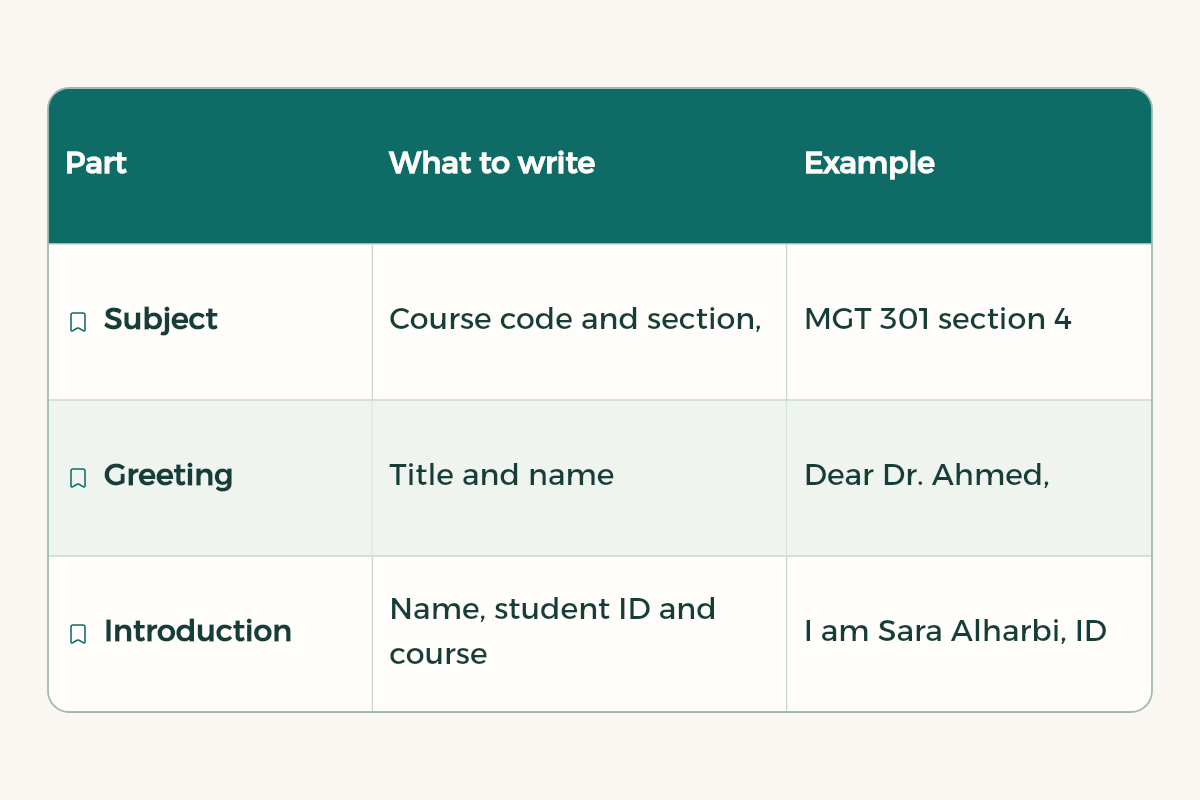
Six parts, in this order, and nothing else:
| Part | What to write | Example |
|---|---|---|
| Subject | Course code and section, then the request | STAT 101 section 3: meeting request to review Test 1 |
| Greeting | Title and surname | Dear Dr. Alharbi, |
| Introduction | Name, student ID and course in one line | I am Reem Alotaibi, ID 44xxxxx, in section 3. |
| Request | What you want, in two or three lines | I would like an office-hours slot to go over question 4. |
| Close | A short thank-you | Thank you for your time, |
| Signature | Name, student ID, major | Reem Alotaibi | 44xxxxx | Business Administration |
With a professor you name the course and section; with an employer you name the role and why you fit it. That is the only real difference.
Why send it from your university email?
Your university address carries your name and student number, so the professor knows at a glance you are in the course. An email from "king_2004" arrives with no identity, and some faculty only answer university addresses. The same address unlocks plenty else; see university email benefits.
How do I write a formal email to a professor asking for a meeting?
Copy this and fill the brackets. It offers two times, so the professor picks instead of searching:
Subject: [Course code] section [number]: meeting request to review [exam]

Dear Dr. [surname],
I am [full name], ID [number], in [course] section [number].
I would like a slot in your office hours to go over my answer to [question or part]. [Two days and times] work for me, or any time that suits you.
Thank you for your time,
[Name] | [Student ID] | [Major]
For absences, grade reviews and recommendation requests there are more templates in how to email a professor, and how to use the meeting itself is in office hours.
How do I email a recruiter in Saudi Arabia?
Same rules, one change: the second line says why you fit. Name one project and its result, not adjectives like "hard-working". Attach your CV as a PDF with a clear name such as "Reem-Alotaibi-CV.pdf", not "cv final 2 new.pdf". Use a personal address with your real name: your student account belongs to your enrolment, so ask your university IT deanship whether it stays open after graduation.
Subject: [Co-op/summer] training request, [department]: [name], [major]

Dear [name or Hiring Team],
I am [name], a level [number] [major] student at [university], looking for a [co-op/summer] placement of [length] starting in [month].
In [course] I worked on [specific project], which [result, with a number if you have one]. I would like to apply that in your [department].
My CV is attached as a PDF [with my university letter, if any].
Kind regards,
[Name] | [Mobile] | [LinkedIn URL]
How big can attachments be?
Gmail allows 25 MB per message, and if your attachments go over that, Gmail swaps them for a Google Drive link in the email.2 Outlook's default limit is 20 MB for internet email accounts, whether that is one large file or several that add up, while Exchange mailboxes default to 10 MB, set by the administrator.4 For a large project file, compress it or attach it as a OneDrive link.5
How do I schedule a formal email in Gmail or Outlook?
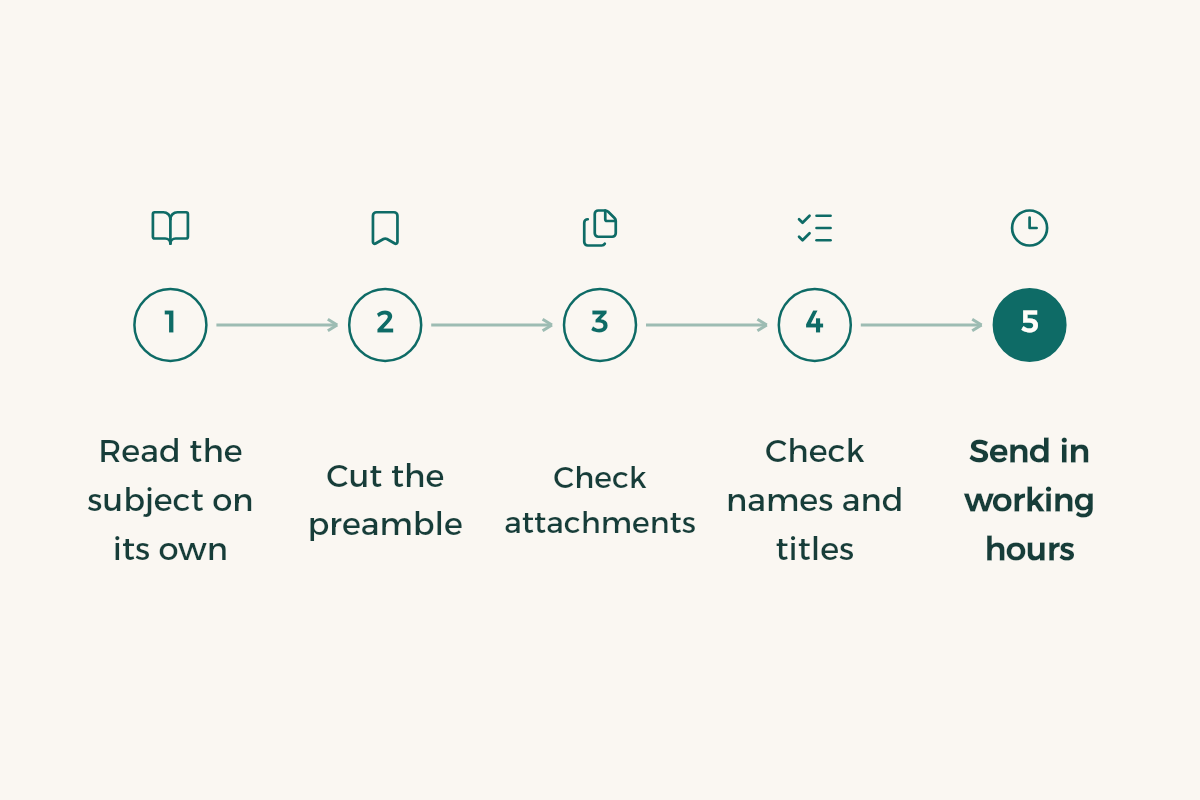
Send in working hours. If you write at night, finish it and schedule it:
- Gmail
Click the arrow next to Send, choose Schedule send, and pick a time. It goes out in the time zone you scheduled it in, and can arrive a few minutes late.1
- New Outlook
Pick Schedule send from the Send button's dropdown. The email waits in Drafts until delivery. It does not work for IMAP or POP accounts.3
- Classic Outlook
Go to Message Options > Delivery options, tick Do not deliver before, and set the date and time.3
- Check the queue
In Gmail, scheduled mail sits under Scheduled in the left panel, where you can cancel or reschedule. You can hold up to 100.1
When should I follow up?
With a professor, after two or three working days, in the same thread, or go to office hours. With an employer, a week after applying or after the reply date they gave. No more than two follow-ups for one request. Keep each one to two lines: a reminder of the first email and what you need now, with no complaint about the silence. If it is urgent, put the deadline in the subject line.
What mistakes get an email ignored?
- An empty subject, or a single word like "Important".
- No name, student ID or section.
- A question the syllabus or the Blackboard announcements already answer.
- Chat language: "hey doc".
- One email to several professors or companies with every address showing in the To field.
- A long backstory before the request.
Which title do I use: Dr., Professor or Mr.?
Copy the title from the faculty member's page on the department website. Doctorate holders get "Dr."; lecturers and teaching assistants get "Mr." or "Ms." with the surname. If you cannot find the page, use "Dr.", since erring upwards costs nothing. Writing in Arabic to a women's campus? Every word needs the feminine form, not just the greeting.
Does every question belong in the professor's inbox?
No. Dropping or adding a course, deferring a semester and course equivalency go to your university's deanship of admission and registration or its portal. Exam timetables come from the college or appear on Blackboard. Your professor answers what belongs to the course: content, assignments, grades and office hours. Sending a registration question to them costs you a week and lands you back at the deanship.
How do I reply when the professor answers?
One line in the same thread: "Thank you, I will come on Sunday at 10 a.m. to office 2048." Confirm the day, time and place, and do not open a new topic in the reply. If you have to cancel, tell them at least a day before, not after the slot has passed.
Which ChatGPT prompts for email writing work for a formal email?
A prompt that rearranges your draft rather than writing it from nothing. Write what you want in your own words first:
Here is a draft formal email to [a professor / a hiring team]: [paste draft].
Rewrite it so the subject line is clear and includes the course code or role, the body is under 120 words, and the tone is respectful without over-apologising.
Do not add any information that is not in my draft.
Can I use ChatGPT in Outlook email to do this? Paste the result into Outlook and read it once more, checking names and course codes by hand. The same approach works for LinkedIn messages and for asking for a recommendation letter.