
By the tiswa editorial team, from the official sources listed at the end of this guide. How we write our guides
A student in Najran opens the calendar two weeks before term and spots one line: registering, dropping and adding courses. She assumes it is a single date, then finds that the summer term words the line differently and that withdrawal is its own item further down. The scene is illustrative, but reading the Najran calendar closely is the shortest road to Najran University course registration without surprises.
How do you register for courses at Najran University?
The academic calendar sits on the university portal in the Deanship of Admission and Registration section. For the first and second semesters it carries a line titled registering, dropping and adding courses, and another for the last date to withdraw from a course or programme.1 The summer semester instead names the start of the electronic registration, drop and add period through the portal, and lists no separate withdrawal deadline. The deanship also publishes a student manual for electronic services, 39 pages long, on the same portal, so download it and read it before you need it.2
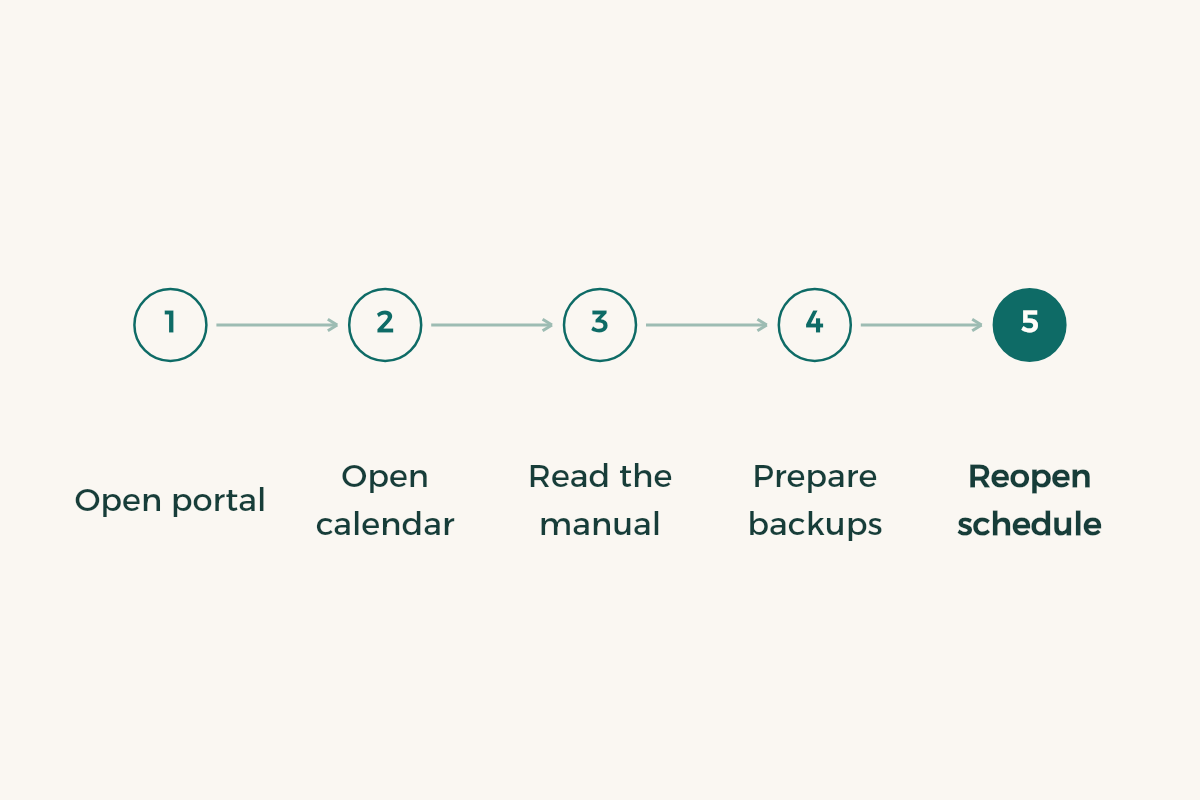
- Open the university portal from its official site
Go to the Deanship of Admission and Registration page. Do not rely on a link from an unofficial account.
- Open the calendar for the current semester
Find the line for registering, dropping and adding courses and the withdrawal line. Copy both dates to your phone.
- Download the e-services manual
Read how each service works before the window and test your sign-in early.
- Prepare courses and backups
List the courses from your study plan and give each one a backup at another time.
- Make the change and reopen your schedule
Compare it with your list, take a screenshot, and check any notification the system sends.
Do all Najran semesters follow the same dates?
No. The calendar shows the first, second and summer semesters each with its own schedule, and each belongs to an academic year with a Hijri label.1 So you cannot tell a friend that registration opens in the same week every term. Read the entry for your semester. Our guide to the Najran academic calendar walks through reading it, which helps if you want to plan the whole term and not only registration week.
What is the difference between drop, add and withdrawal?
Drop and add edit your schedule inside the registration window. Withdrawal has its own calendar line with a last date, and its effect on your record and average is set by the university regulation, not by this guide. Read the published study regulation before withdrawing, and ask your advisor about your own case. The table compares the three.
| Action | Where it appears | What to do first |
|---|---|---|
| Registering courses | Semester calendar and the portal | Prepare courses and backups from your plan |
| Drop and add | Semester calendar and the portal | Check prerequisites and time clashes |
| Withdrawing from a course | Last-date line in the calendar | Read the regulation and ask your advisor about the effect |
Because the effect on your average matters, test your case with the GPA calculation guide before you decide, and read the guide to academic probation if your standing is fragile. Our general add and drop guide explains the idea across Saudi universities.
How does academic advising help before registration?
An advisor sees your plan and what you have finished, so they can judge a crowded schedule better than you can alone. Bring a page with your chosen courses and backups and ask one precise question: does this schedule suit my situation? The way to reach advisors is in the guide to Najran academic advising. Students who wait until the last day find the office crowded, so book a week before the window.
What if you missed the registration window?
Do not guess. Write to the Deanship of Admission and Registration through the official channel published on the university portal. Give your university number, the course you want and the reason, and attach proof of your excuse if you have it. The deanship decides, though a request with complete information reaches a decision faster. Tell your advisor the same day, since they may know someone inside the department who can help. A spoken promise from a classmate or a clerk in another office protects nothing, so ask for the answer in writing and keep it.
After registering, confirm in the first week that your courses show in Blackboard. A correct schedule carries over there, and a missing course is an early warning of a registration problem. If you balance study and work, ordering your time is harder than choosing sections, and the guide to part-time jobs against a timetable can help.
One more case: a student moving between programmes inside the university should settle the transfer first, then choose courses from the new plan. The guide to Najran internal transfer covers that route. Do not drop courses from your current plan before your transfer is clear, because you may still need them.
Before any withdrawal, ask the deanship how it affects your student stipend, which depends on your enrolment. Do not withdraw and then discover you have fallen below the minimum load, a mistake that repeats every term. Look up the minimum in the published regulation, never in what classmates say. For the wider national rules on higher education, the Ministry of Education (MoE) site is the starting point.
How do you keep a new term affordable?
A new term brings costs for a device, software and supplies. Your student card opens many offers, and the student discounts in Saudi Arabia page gathers them, so check it before you pay.