By the tiswa editorial team, from the official sources listed at the end of this guide. How we write our guides
You open Google Forms and type the first question: “Do you agree that long, boring lectures weaken your focus?” By question twenty the tone is the same. A week later you have two hundred responses and nearly all say “agree.” Have you found a result? You have found an echo. The word “boring” told respondents what was wanted before they thought.
Is Google Forms suitable for a university survey?
For most student surveys, yes. It collects responses, shows them in charts, and the data can be opened in Google Sheets for analysis.2 But the tool does not judge your questions; it shows them exactly as typed. So split the work in two: building the form, covered in our Google Forms guide, and writing the questions, which is this page. If the survey is part of a graduation project, see the methodology section guide for describing the tool and the sample.
What makes a survey question biased?
Pew Research Center, a well-known name in survey methods, describes several ways wording distorts answers.1 Three matter most for students.
| Problem | Example (for illustration only) | Safer version |
|---|---|---|
| Two ideas in one question | Is the course easy and enjoyable? | Two questions: Is the course easy? Is the course enjoyable? |
| A word that carries a verdict | Do you think the exhausting assignments are too many? | How many assignments do you usually submit in a week? |
| Unbalanced options | Excellent, very good, good, acceptable | Very satisfied, satisfied, neutral, dissatisfied, very dissatisfied |
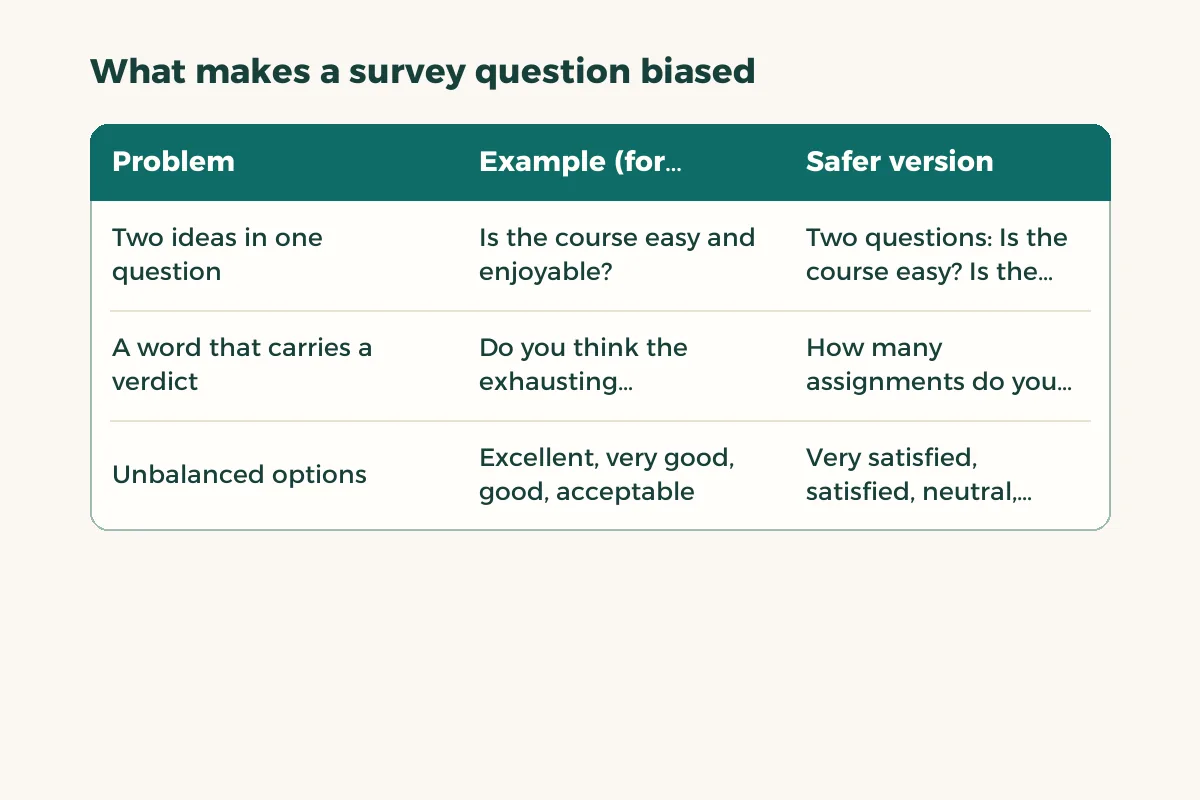
The examples are written to teach the point, not taken from a real survey. Notice that the safer second question moved from an opinion to a countable fact. Whenever you can ask about specific behaviour instead of a general impression, do.
How do you write neutral questions step by step?
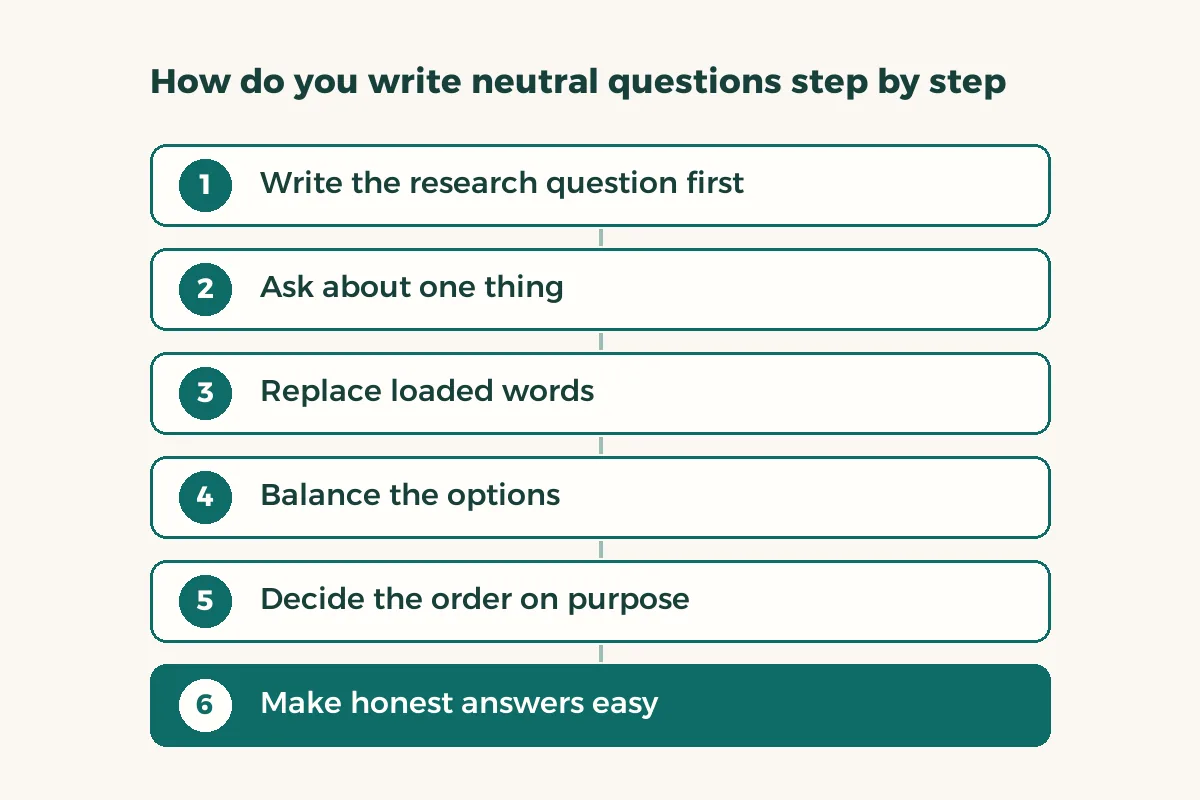
- Write the research question first
What do you want to find out? Every question in the form must serve it. If you cannot say how you will use an answer, delete the question.
- Ask about one thing
If an “and” joins two ideas, split the question. A respondent who agrees with half of it cannot choose.1
- Replace loaded words
Remove adjectives such as “exhausting,” “excellent” or “failed” from the question text. Leave judgement to the respondent, in the options.
- Balance the options
Equal numbers of options on each side, with a neutral choice where it fits. For opinion questions Pew suggests keeping the list short, usually four or five choices, without overlap.1
- Decide the order on purpose
A general satisfaction question asked before detailed ones can produce a different result than the same question asked after, because earlier questions prime the respondent.1
- Make honest answers easy
Where honesty might embarrass the respondent, keep the survey anonymous if you do not need names and offer a “prefer not to answer” option.
- Pilot before sending
Send the form to five people from your sample group and ask them to read it aloud and say where they stumbled.
How do you make an anonymous survey in Google Forms?
Anonymity is a design choice, so decide it before you write the questions. If your research does not need names or emails, do not ask for them, and look through the form settings to confirm that nothing requires respondents to sign in or leaves their email attached to the answer. A student who knows that a classmate or an instructor cannot be matched to the answers is more likely to be honest about workload, teaching quality or attendance.
Say what you did in the form description, in one sentence: what the survey is for, who sees the results and whether answers can be traced. Do not promise more than the settings deliver. If you need to follow the same people across two rounds, anonymity is not possible and you should tell them so.
Should you use agree and disagree options?
Avoid them where you can. Pew notes that respondents tend to agree with statements put to them, especially people who have thought less about the topic, and that offering a choice between two alternative statements is generally better.1 Instead of “I agree the library is open long enough,” ask: “Which statement is closer to your view: the library hours are enough for me, or the library hours are not enough for me?”
If you do need a scale, label the ends clearly and keep its direction the same in every question. Flipping the direction halfway through the form catches a hurried respondent out in a way they never intended. For working with the results afterwards, Google Sheets and choosing a chart type will help.
How do you pilot a form with five people?
A pilot does not need a large sample. It needs readers who did not write the form. Ask each person to open it, answer it, and comment wherever a question confused them or meant something different to them. Then ask: what do you think the researcher wants you to answer? If they can name the expected direction, the question is steering.
| What the tester says | What it means | What you do |
|---|---|---|
| I did not understand what you mean by this | A vague word | Define it or replace it |
| Both options apply to me | Two ideas in one question | Split the question |
| None of the options fits me | Options are incomplete | Add “other” or a neutral choice |
| I knew what you wanted me to say | A leading question | Reword with neutral language |
Remove the pilot responses before the real launch, or start a fresh copy of the form. Never mix answers from a draft version into your results.
How do you use Forms features without losing neutrality?
Google Forms can show questions depending on earlier answers.2 Use that to spare people questions that do not apply to them, but do not let the first question steer the rest of the path with suggestive wording. And check that a question meant for one group is not compulsory for everyone else, because a forced answer is a bad data point.
If the survey belongs to a course and needs approval, ask your instructor which procedure your university uses. It differs between universities and we give no general rule. To present your results as a readable report, see survey report from Excel to Word.