By the tiswa editorial team, from the official sources listed at the end of this guide. How we write our guides
In an introductory economics course you will meet “opportunity cost” and its Arabic equivalent on the same page, and be asked about it in one language or two. If you memorise them in an app that flips line direction and scrambles Arabic with English, your eyes tire before your mind does. These terms are general economics examples, not content from any one university’s course, and we use them to build a test that works for any course.
How do you choose a flashcard app for a university course’s terminology?
Do not start by comparing names. Start with ten minutes: write five cards from your course, two in Arabic, one in English and two that mix both, and try them in each app you are considering. In those ten minutes you will learn what a store page cannot tell you.
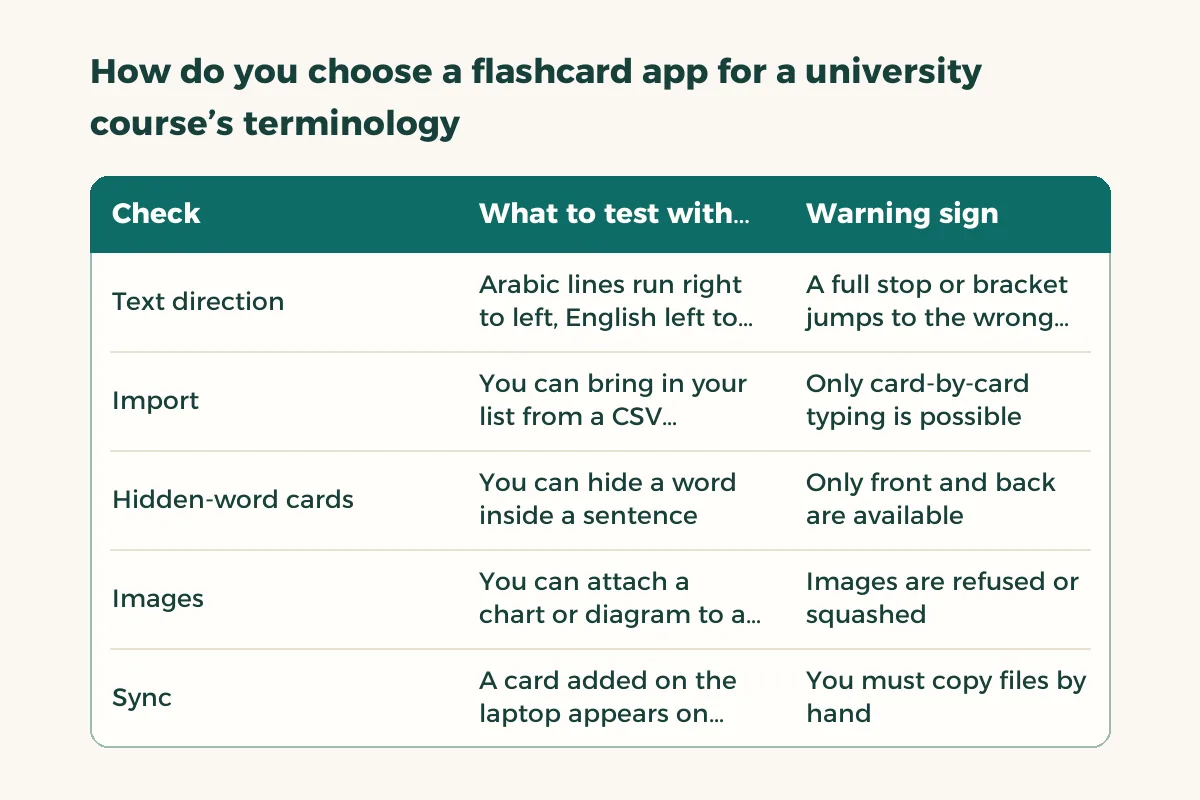
| Check | What to test with five cards | Warning sign |
|---|---|---|
| Text direction | Arabic lines run right to left, English left to right, and brackets stay put | A full stop or bracket jumps to the wrong side |
| Import | You can bring in your list from a CSV spreadsheet in one go2 | Only card-by-card typing is possible |
| Hidden-word cards | You can hide a word inside a sentence1 | Only front and back are available |
| Images | You can attach a chart or diagram to a card1 | Images are refused or squashed |
| Sync | A card added on the laptop appears on the phone | You must copy files by hand |
| Data and plan | You know the price and where your cards are stored | No clear policy or price |
Does the app display Arabic and English terms in the right direction?
This comes first because it is the hardest problem to fix later. On the web, a direction setting tells the browser whether text runs right to left, and the W3C explains how display goes wrong when it is missing.4 Apps work the same way: some let you set the direction of a field, which is what the Anki manual mentions for languages written right to left such as Arabic.1 Type a card like “elasticity (المرونة)” and see whether the brackets stay where they belong.
If you also study an Arabic-language subject, the same test applies: vowel marks and diacritics should survive sync. Take a screenshot before and after and compare.
How do you move a course’s terms into the app without typing every card?
The terms usually exist already: in the textbook index, on the first page of each chapter, or in your instructor’s file. Collect them in a two-column table, term and definition, and save it as CSV. Some apps accept that file directly. The Anki manual describes the format it expects and notes that a spreadsheet program such as LibreOffice can save in it.2
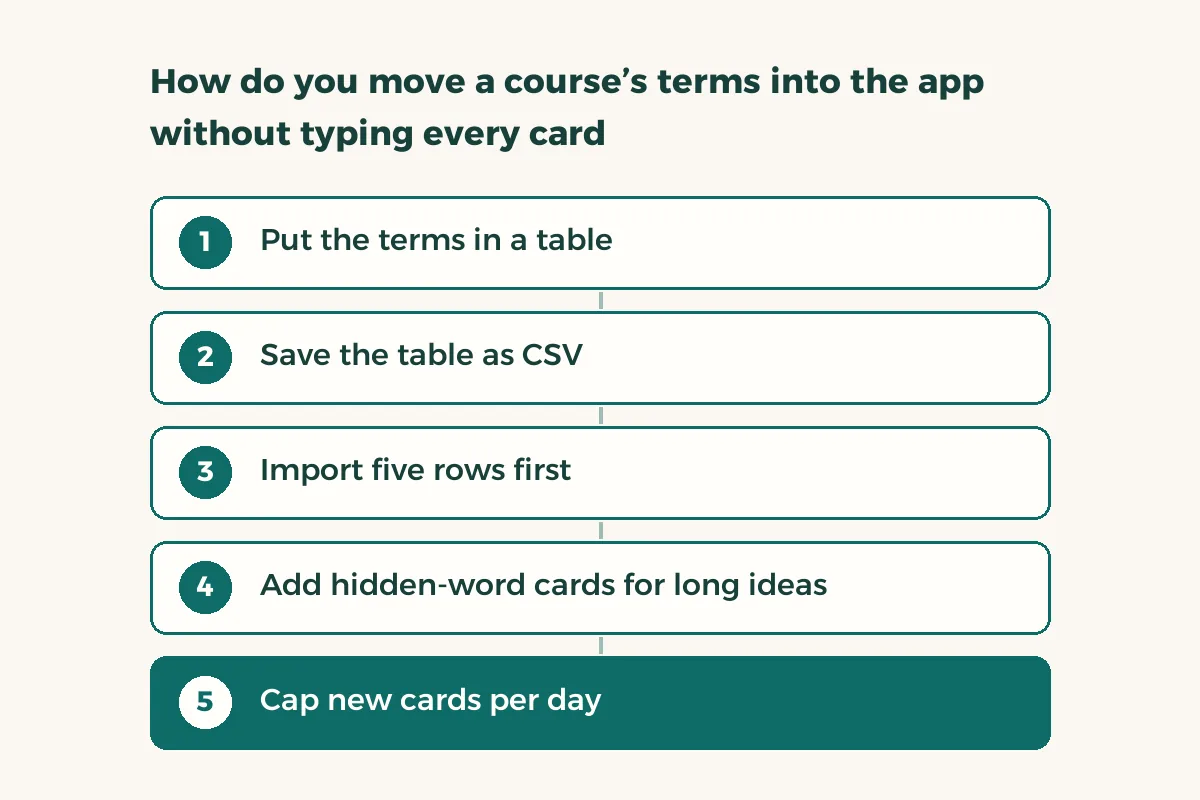
- Put the terms in a table
One column for the term, one for the definition in your own words rather than the textbook’s sentence.
- Save the table as CSV
Use Save As in your spreadsheet program and pick UTF-8 encoding, so Arabic letters do not turn into symbols.
- Import five rows first
Check that columns landed in the right fields and the Arabic is intact before importing the rest.2
- Add hidden-word cards for long ideas
Turn the definition into a sentence and hide the key word, so you revise with context rather than word for word.1
- Cap new cards per day
Start small, ten cards for example. Piling up reviews is the first reason people abandon these apps.
When should a flashcard not be a plain term and definition?
The weakest card asks “What is the definition of elasticity?” and trains you to recite one sentence. A stronger one asks, “If the price of bread rises 10% and demand falls 5%, is demand elastic?” The figures are only an illustration. The point is to turn a term into a situation. To see why this works, read the active recall example from a lecture, and how to memorize fast covers other methods.
Apps limited to front and back put more work on you, because you write the questions. Those that support hidden words and images let you lift a chart from the textbook and ask about its parts. Where does the equilibrium point sit on the graph? Make the card ask you.
Is a free flashcard app enough for a whole semester?
Usually yes, but read the plan. Ask three things. Can I export my cards if I change my mind? Is sync free or part of a subscription? What happens to my deck if I delete my account? Exporting your cards as text protects you from being locked into one app. And do not pay for a yearly plan in week one: an app you open on day three and not on day ten does not deserve a subscription.
For a wider comparison of study apps covering cards, planners and focus tools, read study apps. If your major is medical, medical terminology has a memorising plan that fits it.