By the tiswa editorial team, from the official sources listed at the end of this guide. How we write our guides
Study apps for students do not study for you. The good ones push you into two habits that work: recalling an answer from memory instead of rereading, and spreading revision across days instead of the night before. Every app here serves one of those, or protects the study hour itself.
Quick comparison
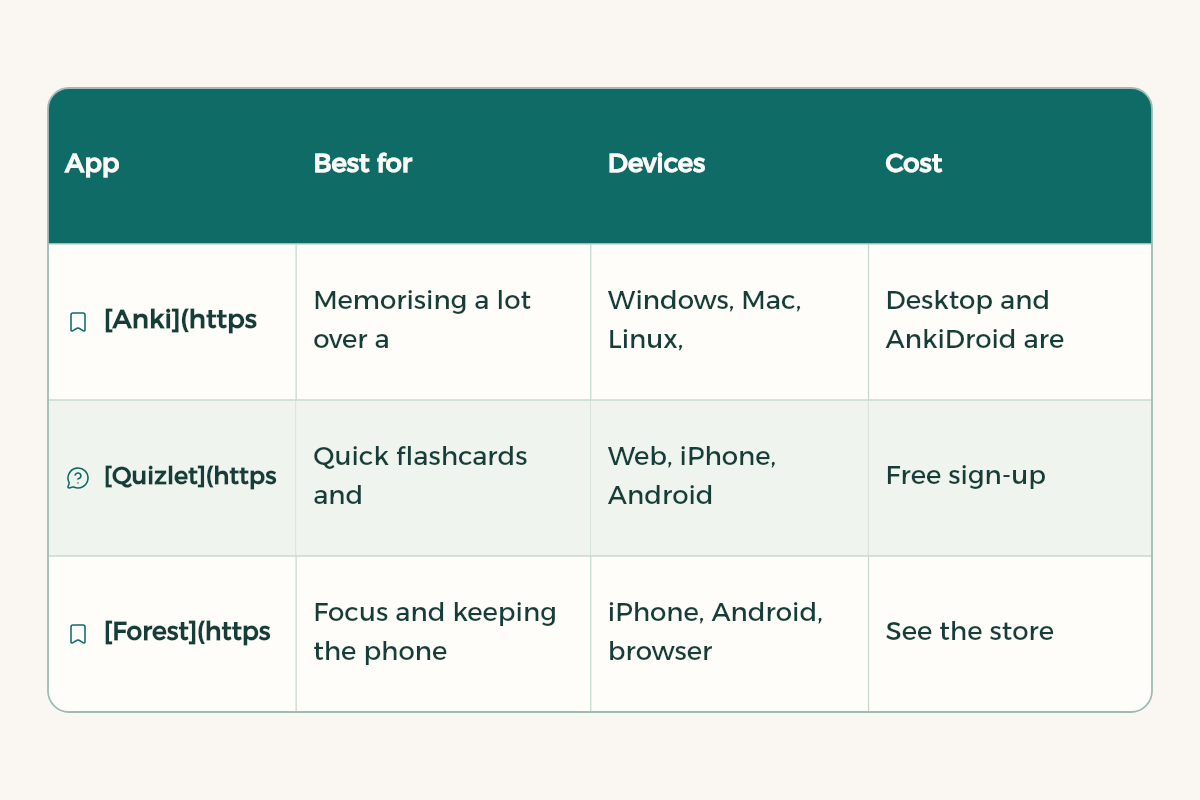
| App | Best for | Devices | Cost |
|---|---|---|---|
| Anki | Memorising a lot over a long time: medical terms, anatomy, formulas, English vocabulary | Windows, Mac, Linux, Android, iPhone | Desktop and AnkiDroid are free, AnkiMobile for iPhone is paid |
| Quizlet | Quick flashcards and sharing sets with classmates | Web, iPhone, Android | Free sign-up |
| Forest | Focus and keeping the phone away | iPhone, Android, browser extension | See the store |
| Notion | Summaries and revision tables | Every device | Education plan for students, current offer on tiswa |
| Gemini Notebook | Asking questions about your own files: lectures and PDF books | Web and mobile | From Google |
Anki: for courses with a lot to memorise
Anki is a flashcard program. You rate yourself after each card and it schedules the next review for when you are most likely to forget. Hard cards come back often, easy ones drift further away. It handles images, audio, video and scientific markup, copes with decks of 100,000+ cards, and the AnkiWeb sync service between your devices is free.
Medicine, nursing and pharmacy students use it for terms, drugs and anatomy, engineers for formulas, and everyone for English vocabulary. If English is your next hurdle, see learn English for university.
Turn a lecture into flashcards in 15 minutes
- Make a deck
In Anki, click Create Deck, name it after the course, and add a sub-deck for each chapter.
- Pull out questions
As you go through the slides, write each fact as a question with one short answer. "What does the kidney do?" is a weak card. "Which pancreatic hormone lowers blood sugar?" is a strong one.
- Add an image when it helps
For anatomy, circuits and diagrams, paste the image on the front and hide the label you need to recall.
- Review every day
Open Anki daily and clear the day's cards, even if it takes ten minutes. The gain comes from consistency, not long sessions.
- Rate honestly
If you hesitated, press Hard or Again. Honest ratings are what make the scheduling work.

You can let AI draft the first pass from your own notes, then check and fix every card before you add it:
Here are my notes from a [course name] lecture on [topic]: [paste notes]. Turn them into 20 question and answer flashcards. Keep each answer under 12 words and test only one fact per card. Put them in a two-column table, Question and Answer, so I can paste them into Anki. Do not add any fact that is not in my notes.
A revision schedule before the exam
If you do not use Anki, you can apply the same spaced revision idea by hand. Review each lecture at growing intervals, and make every review a recall from memory before you open the file:
| Review | When | What to do |
|---|---|---|
| First | The day of the lecture | Write the 5 main ideas from memory, then compare with the slides |
| Second | Two or three days later | Answer the lecture's questions or cards without looking at the answers |
| Third | A week later | Explain the lecture out loud as if teaching a classmate |
| Fourth | Two or three weeks later | Solve past exam questions or end-of-chapter problems |
| Last | Two days before the exam | Review only what you got wrong in earlier reviews |
Put these dates in your calendar on the day of the lecture. The method is in time management apps for students.
Quizlet: quick cards and sharing
Quizlet suits a fast start or a study group: build a set, send the link to classmates, and use its study modes and practice tests on the same cards. If a course has little to memorise or the exam is close, Quizlet is quicker. If the course is long and you will need it next year, Anki fits better.
Forest: protect the study hour
The best revision app does nothing if your phone interrupts every five minutes. Forest is a focus timer where a tree grows while you stay focused and dies if you leave for other apps, with an allowlist for the apps you need. The full plan is in time management apps for students.
Notion and Gemini Notebook: summaries and questions
Notion is where each course's summary, revision table and lecture links live. Gemini Notebook from Google (formerly NotebookLM) lets you add your sources, such as lecture files, and ask questions about them, with answers grounded in the information you provide. It can also read you an audio overview of your sources. If you study on an iPad, see the best note taking app for iPad.
Your week with just three apps
You do not need every app in the comparison. Most students do fine with three: one to plan, one to focus and one to revise. Here is how they fit together in a normal week:
| When | App | What you do |
|---|---|---|
| Start of the week | Notion | See upcoming assignments and exams and set the week's tasks |
| Every study session | Forest or the phone timer | Short Pomodoro focus sessions |
| After each lecture | Anki | Add cards for new terms and ideas |
| Ten minutes a day | Anki | Review the cards the app shows you |
| A week before the exam | Gemini Notebook | Upload the slides and make practice quizzes from them |
Mistakes that make apps waste your time
- Downloading every app you hear about: each new app takes time to learn, and that time comes out of studying.
- Making far too many cards: a card for every line makes daily review so long that you quit. Write cards for key ideas only.
- Skipping review days: Anki works through regular repetition, and one missed day piles cards onto the next.
- Letting AI summarise everything for you: a summary you write yourself sticks better than one you read.
To start with focus, read the Pomodoro technique. To revise from your own files, see our Gemini Notebook guide.






Which one for my major?
- Health and medicine: Anki for daily memorising, Gemini Notebook for questions on long textbooks.
- Engineering and science: solving problems matters more than cards. Use Anki for formulas only, and paper for the rest.
- Business and law: summaries in Notion, Quizlet for definitions before the exam.
- Computer science: cards for concepts, real practice in code. See how to learn programming from scratch.