By the tiswa editorial team, from the official sources listed at the end of this guide. How we write our guides
Four classmates, one Principles of Marketing course, a first test in ten days. That is our example, and the steps fit any course. You agree to study the marketing mix chapter together. Two hours go by reading slides aloud, and then one of you admits they remember nothing. Reading together is pleasant, yet it forces nobody to retrieve anything.
Which interactive apps help students study?
No single app wins; each suits a moment. Choose by what you want tonight: to test yourself alone, to play with classmates, or to build cards you review over weeks.
| You want | Tool | What it gives you | Watch for |
|---|---|---|---|
| A marked solo quiz | Google Forms in quiz mode | Marks answers and shows what you missed1 | The answer key works with set question types |
| A live game with classmates | Kahoot | A question game others join through a join link2 | Check the free-plan limits when you sign up |
| Long-range review | Anki | Cards that return on a spaced schedule4 | You must write the cards yourself |
| Swapping questions | A shared notes document | Each classmate writes questions for the others | Nothing marks them for you |
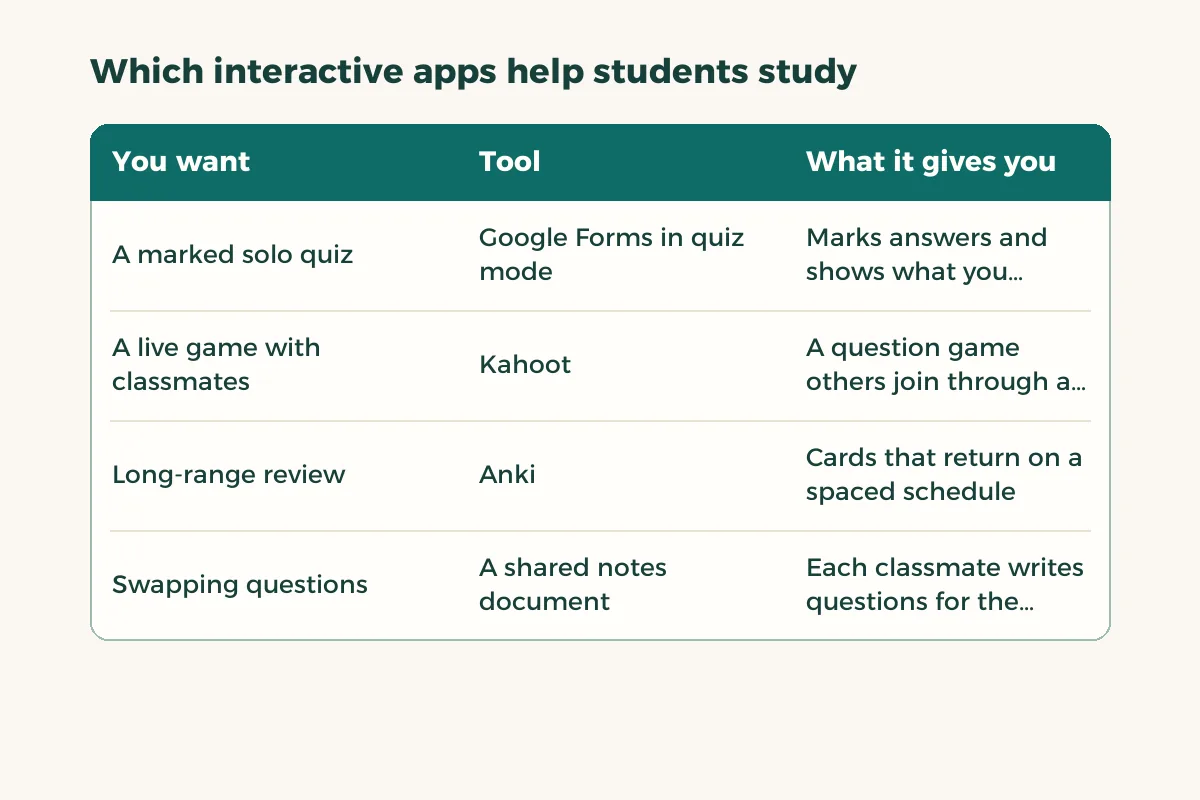
The difference is who marks and when. That is why we do not fold them into one “best apps” list; the general ranking sits in study apps for students.
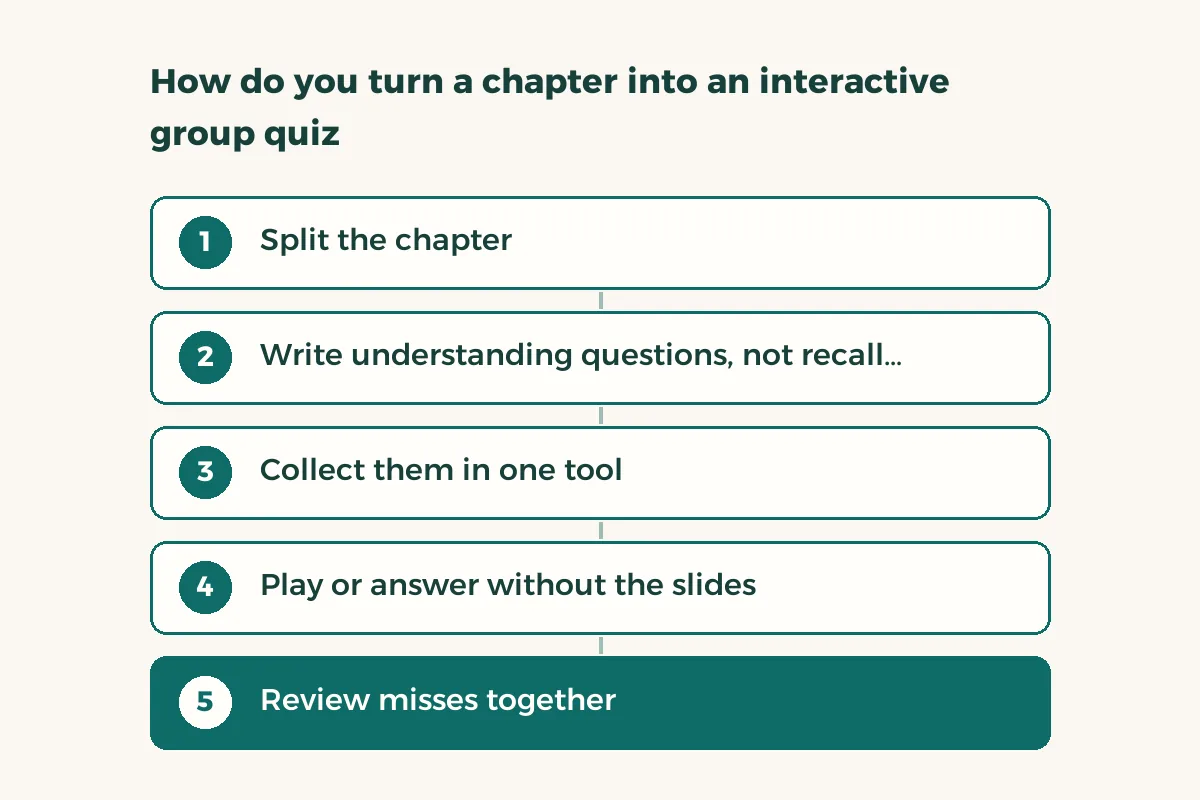
How do you turn a chapter into an interactive group quiz?
- Split the chapter
Each person takes a section and writes five questions from it. Everyone learns their section deeply because they will be asked about it.
- Write understanding questions, not recall questions
“What separates price from customer value?” beats “Define price.” The first forces an explanation.
- Collect them in one tool
Use a Google Form for a solo quiz, or a group game for a live session.
- Play or answer without the slides
Set a time and keep the lecture file closed. A quiz where you sneak a look at the file tests nothing.
- Review misses together
Any question two or more of you got wrong becomes a card. Those questions are your revision plan before the test.
How do you build a self-marking quiz in Google Forms?
Open the form, go to Settings and turn on the quiz option. Add your questions, mark the correct answer and set points for each. You can attach an explanation that shows on a wrong answer, and choose when scores appear: right away or after you have reviewed them.1 The answer key works with multiple choice, short answer, dropdown, checkboxes and grid questions, so shape your questions that way.
If you want a score per person, turn on email collection in settings; it is off by default.1 To share the quiz with classmates outside your organisation, turn off the domain restriction. We cover the other options in the Google Forms guide.
Are interactive apps better than just reading?
Yes if you retrieve the answer yourself, no if you only play. Kahoot’s own features page lists flashcards, exam preparation and study groups among what it offers,2 but a tool does not create understanding. A question you wrote and an answer you tried before seeing the key do. That is active recall, covered in active recall and spaced repetition.
One rule for groups: do not replay the same game two days running. Leave it a week and bring back only the questions you missed. For a wider plan for your sessions, group study shows how to split roles.
| Situation | Best fit | Why |
|---|---|---|
| Night before the test, alone | Google Form | Instant marking, no scheduling with classmates |
| Session with four classmates | Group game | Light competition makes everyone answer |
| A whole chapter a month away | Anki cards | Spaced review spreads the work4 |
| A chapter you do not understand yet | None of these | Read it and explain it to a classmate first, then test |
Are interactive apps safe for your data?
Read before you invite classmates. Each app wants an account, and some record player names and answers. On Google Play the Data safety section shows what the developer says it collects and shares, and Google notes that these statements come from the developer and are not verified by Google.3 Read the section, and use a nickname in games when your real name is not needed.
- Open the app’s store page
On Google Play or the Apple store, see what it collects and shares.3
- Keep your instructor’s material out
Past exam papers and protected course files fall under your university’s rules. Ask before uploading them.
- Use your own questions
Questions built from your own notes raise no rights issue, and they help you more.
- Delete the session afterwards
If you no longer need the questions, remove them from your account.
Question: “What separates ... from ...?” or “When do we choose ... instead of ...?”\nFour options: one correct and three mistakes students really make.\nExplanation after the answer: one line, with the slide number.
The notes you build questions from are covered in how to take notes.