By the tiswa editorial team, from the official sources listed at the end of this guide. How we write our guides
The lecture file runs a hundred and forty pages. Another with nearly the same name sits beside it, and a third came through WhatsApp. You read twenty pages of one, then find you were in the old version. The time went before study even began. The problem was where the files lived, not your patience.
Where do you keep all your course files in one place?
Pick one place you open every day. On iPhone and iPad, the Books app opens PDFs and keeps them in your library with markup tools.1 In Google Drive you keep files in folders, search them and open them from any device.2 Which is better matters less than there being one, not two. Splitting a single course across two apps costs half an hour of searching before each study session.
Give each course a folder, and inside it a folder per week or chapter if the course is big. Do not drop files in one general folder called University.
How do you name PDF files so you never lose them?
A file name works as an index if you write it in a fixed order. This pattern works on any device because names sort alphabetically or numerically:
| Part | Example (illustrative) | Why |
|---|---|---|
| Course code | ECON101 | Groups the course’s files |
| Week number | W03 | Sorts in teaching order |
| Topic | elasticity | Tells you the content before opening |
| Version | v2 only when needed | Prevents mix-ups with old copies |
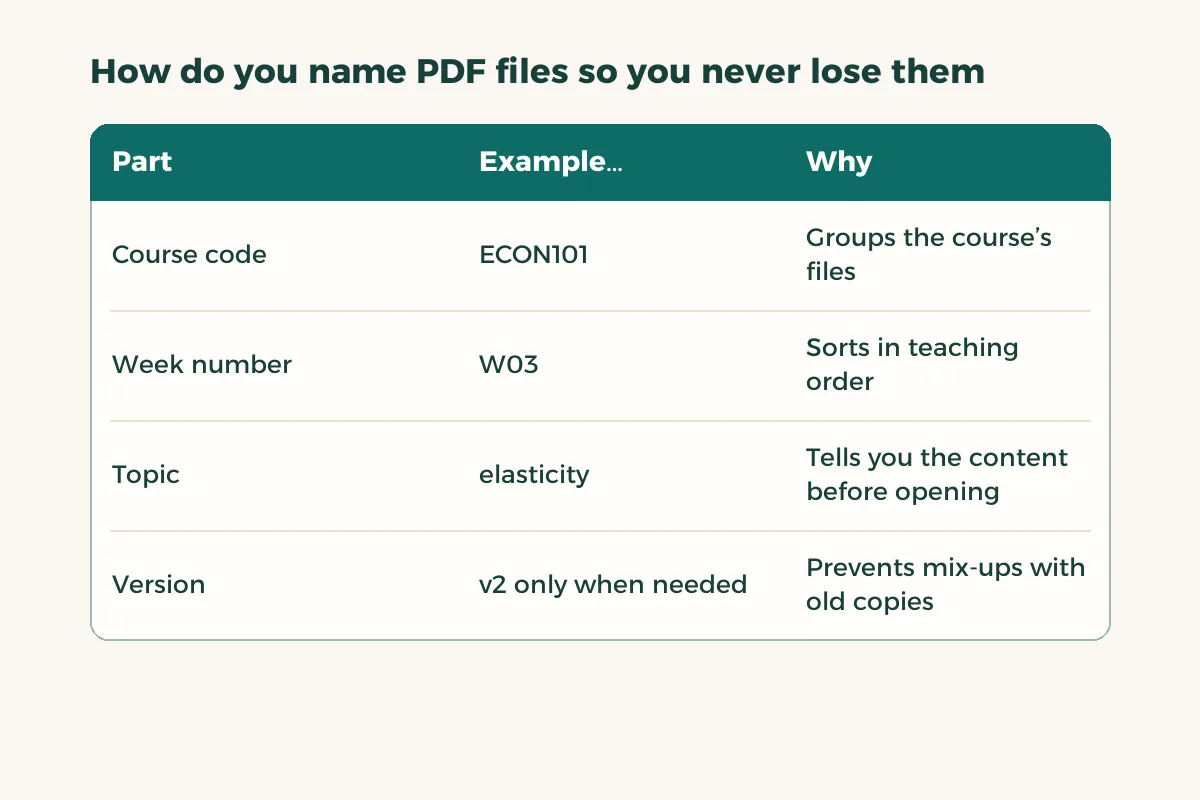
A name like ECON101-W03-elasticity tells you everything. A file called lecture3 final2 will mean nothing in a month. When an instructor sends an updated copy, delete the old one at once or move it to a folder named old. Google Drive also keeps a version history for a file you update, so you can go back to an earlier one.3
How do you read a long PDF without losing focus?
Read each chapter in three passes, each with one goal. A pass with a clear goal ends faster than reading with none.
- Scan (ten minutes)
Skim headings, tables, figures and end-of-chapter questions. Do not read paragraphs. Write three questions you expect the chapter to answer.
- Slow read
Read with the markup tool on. Highlight definitions in one colour, examples in a second and what you do not understand in a third. Mark the sentence whose loss would break the meaning, not the whole paragraph.
- Answer your questions
Return to your three questions and answer them in your own words without looking. Whatever you could not answer is where you go back.
- Return to marks only
Two days later, open the file and look at the marked pages. That is your second review, and it takes a quarter of the time.

Should you highlight in the file or take separate notes?
Both, for different jobs. Highlighting points you to the important page. A separate note proves you understood. Do not copy the paragraph word for word; write the idea in one sentence of your own and add the page number. If the detail slips, you go back to the page. For note methods see how to take notes, and if you use an iPad with a pencil see note-taking apps for iPad.
What about huge or scanned PDFs?
Some files are pictures of pages, so they will not search or highlight precisely. Search for a word you know is on the page; if nothing comes up, the file is an image. Some apps offer text recognition, so check your app’s settings. If a file is too big to send, read compress a PDF. For phone-scanned pages see scan documents on iPhone.
If one chapter is split into several small files, merge them once you have checked the order, as in merge PDF files. One file per chapter is easier to mark and search than five loose ones.
What mistakes ruin reading long files?
The first is highlighting without limit: when half the page is coloured, colour means nothing. Set yourself a ceiling, three sentences a page at most. The second is reading on your phone during the commute and believing you studied; that is the scan stage only, and the slow read needs a bigger screen and a quiet session. The third is postponing the second review to the night before the exam, which turns it into a first read. And if a file will not accept markup at all, copy it into an app that does, and make sure the new copy is the one you work on from now on.
Should you summarise PDFs with AI?
It can help with the first scan, but it does not replace reading. If you use it, use it after the scan rather than instead of it, and check what it writes against the pages. The full method is in summarise PDFs with AI, and for writing on the file itself see write on a PDF. Do not upload files containing personal data or unpublished research without permission.
How do you prepare your files before the exam?
- Pull out your marks
List the marked pages for each chapter by page number.
- Read the not-understood colour first
Those are the questions to ask your instructor or a classmate.
- Test yourself on the three questions
For each chapter, answer without looking, then compare.
- Keep a backup
Copy the course folder to a second place before exam week.
You do not need paid tools for any of this. If you want reading and markup apps anyway, browse student deals and compare before you subscribe.