By the tiswa editorial team, from the official sources listed at the end of this guide. How we write our guides
Your course needs a scientific poster on the project, and a friend says, “sign up for Canva for Education and get everything free.” You open the page and find rules about teachers and schools. This is where many students stall: am I covered? The answer is no, but the poster is still possible, with free tools.
What is Canva for Education and who is it for?
Canva describes it as free for eligible school-level teachers (primary and secondary) and for the students they invite.12 It also covers accredited schools and school districts. Teachers who are not currently working in a school are not eligible, and neither are home educators or private tutors.2
For university and college students, Canva’s pages say the education plan is not available to them at the moment.2 Policies change, so the official page is the reference, not a forum post or a short video. If you are looking for an official route to the paid plan, the full picture is in Canva Pro free for students.
Can a university student use Canva for Education?
According to what Canva publishes, no. Applying as a teacher while you are a student means giving the company false information, so do not. Read the rules straight from the official page.2 If you already work as a teacher in a school, that is a different case, and Canva does the verification.
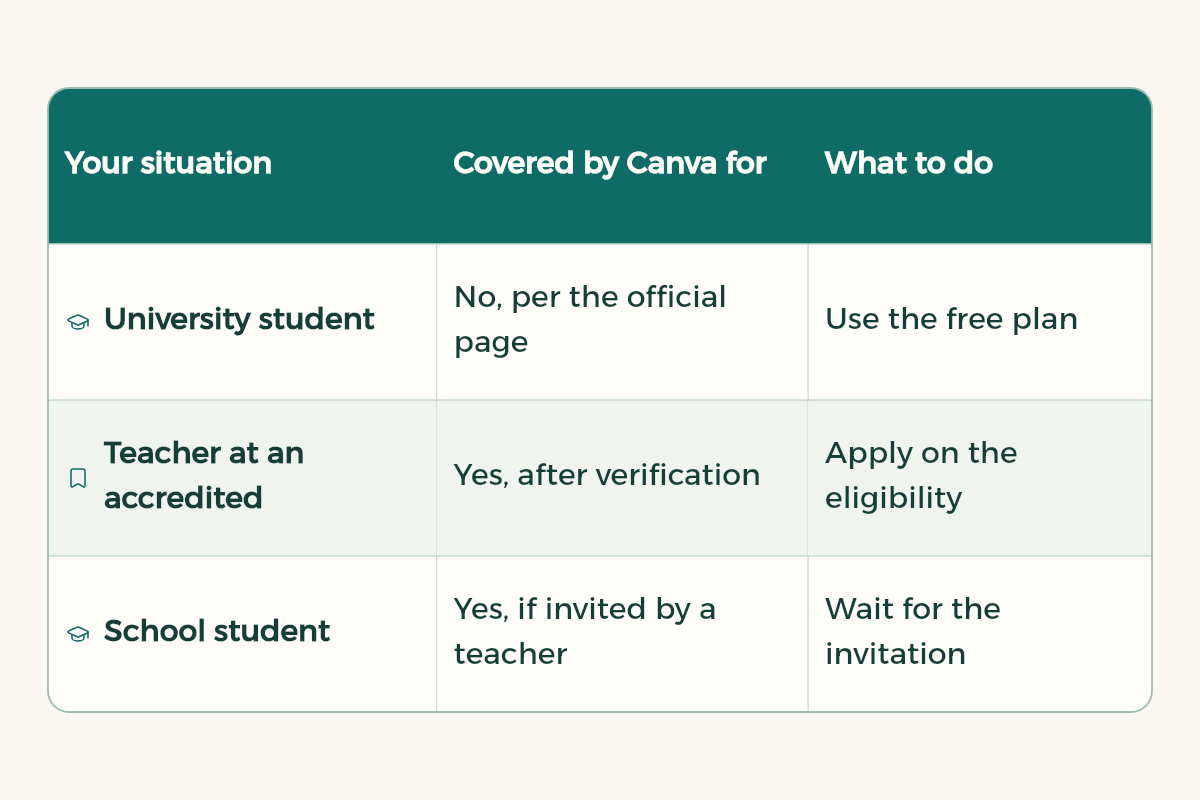
| Your situation | Covered by Canva for Education? | What to do |
|---|---|---|
| University student | No, per the official page | Use the free plan |
| Teacher at an accredited school | Yes, after verification | Apply on the eligibility page |
| School student | Yes, if invited by a teacher | Wait for the invitation |
| Private tutor | No | Use the free plan |
How do I design a course poster in free Canva?
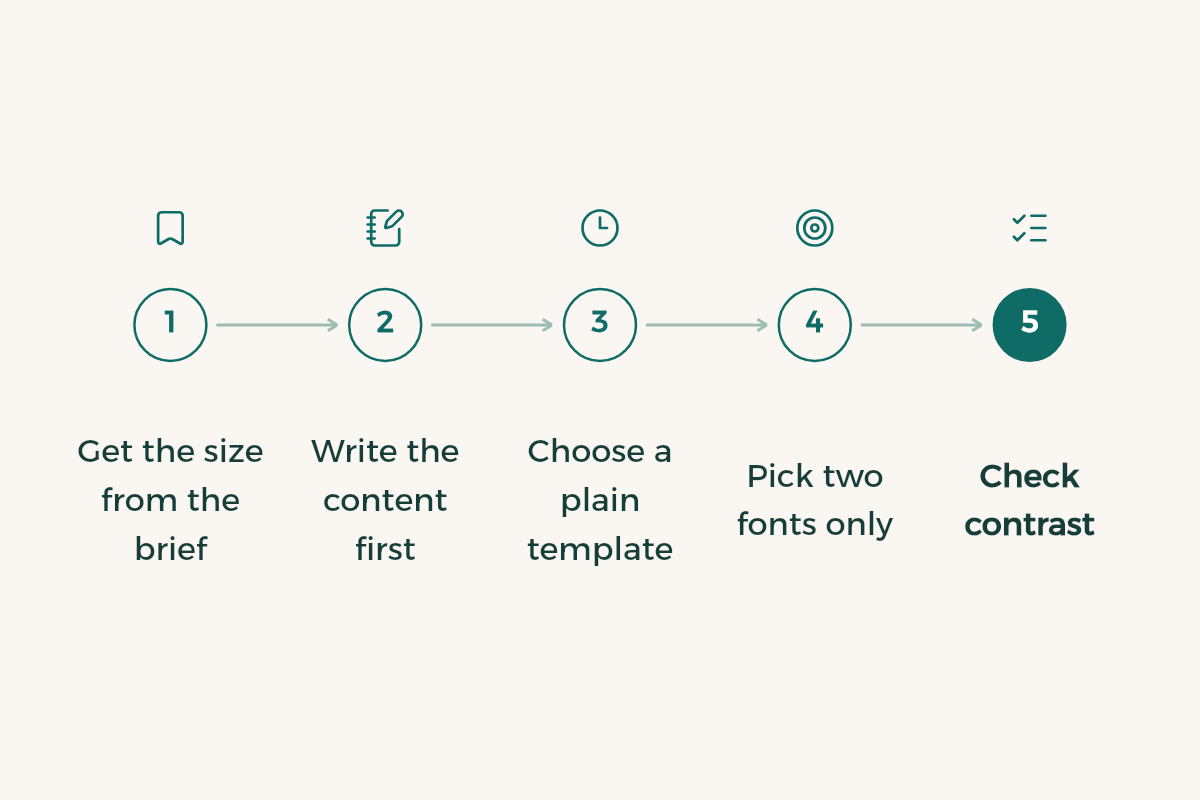
- Get the size from the brief
Ask your instructor or read the course file: poster width and height, printed or on screen? Start with the right size, not the prettiest template.
- Write the content first
Research question, method, result, conclusion. Four blocks, each no longer than four lines.
- Choose a plain template
Two columns at most and plenty of white space. Skip templates with five colours.
- Pick two fonts only
One for headings, one for body. If it will be printed, the body should be readable from two metres.
- Check contrast
Test that the text colour stands out from the background. The W3C asks for 4.5 to 1 for normal text and 3 to 1 for large text.3
- Export a PDF
For submission and printing, PDF keeps the page layout. Keep the original design file for edits.
If the poster is more of an information graphic than a scientific one, the layout rules in infographic design apply.
How do I know my poster colours are readable?
Your eye alone will fool you, because a bright laptop screen makes almost every colour look readable. The measure the web uses is the contrast ratio between text and background: at least 4.5 to 1 for normal text and 3 to 1 for large text.3 Any free contrast checker computes it in seconds. For a printed poster, print one page in black and white. If a line of text disappears, that colour is too weak.
How do I make a presentation in Canva for a university course?
A presentation differs from a poster: people read it quickly from a distance while you talk over it. So each slide carries one idea and you carry the detail. Do not paste paragraphs from your report onto slides.
- Start with a three-line plan
The problem, what you did, what you found. Each line becomes a section of slides.
- One idea per slide
A short headline written as a full sentence, with a chart, number or picture beside it. No more than four lines of text.
- Give numbers room
If your result is a number, show it large, about a third of the slide, with one line of explanation underneath.
- Rehearse out loud
Read the slides aloud against a timer. A slide that needs two minutes should be split in two.
- Export a backup
Download a PDF and copy it to a USB stick or Drive, because the lecture hall may have no internet.
How do I make a presentation available offline in Canva?
Canva runs in the browser, so do not assume the design will open in the lecture hall. The practical answer is to download a copy before the session, a PDF for viewing or the format your instructor asked for, and to open it with your internet switched off the day before. This is a habit, not a Canva feature claim; check Canva’s help pages for what its own apps offer.
How do I work with classmates on one design?
In group work two people edit the same slide and one person’s work disappears. The simplest fix is to assign slides by name before anyone starts, and to let only one person do the final merge. Give reviewers a view-only link. Keep the supporting files, such as pictures and data, in one Drive folder with clear permissions, as in capstone file permissions in Drive. Before submission, one of you reads every slide aloud to catch typos, because eyes skip their own mistakes and catch a teammate’s.
How do I get the file ready to submit?
Before submitting, export the PDF and open it on a device that is not yours. Arabic fonts sometimes change if they are not embedded, and a line can shift out of place. Open it on your phone too. Then name the file with your name and the course code, because a marker receives dozens. If a slide deck is due with the poster, PowerPoint design tips will help.
If you want more tools for your studies at real discounts, browse student discounts in Saudi Arabia and the Student Discount Index instead of hunting for dubious accounts.