By the tiswa editorial team, from the official sources listed at the end of this guide. How we write our guides
Seven tools, five jobs, and 12 free months of Google AI Plus for university students:4 that covers most of what a student needs, not a list of fifty sites. The lists that go around name dozens of apps without saying what is free in each, or what suits a student at a Saudi university who reads in English and writes reports in Arabic. Here they are by task, with every number from the tool's own page.
What are the best free AI tools for students?
| Tool | Job | Free plan | Price if you need more |
|---|---|---|---|
| ChatGPT | Understanding and self-testing | Study mode on every plan1 | Plus at USD 20 a month2 |
| Claude | Long writing and organising courses | Web search, memory and up to 5 projects3 | Pro at USD 20 a month, or 17 billed yearly3 |
| Gemini | All-round assistant with storage | Yes, on any Google account | Google AI Plus free for 12 months for students4 |
| NotebookLM | Studying from your own files | Up to 50 sources per notebook5 | Higher limits on Google AI plans5 |
| Perplexity | Finding sources | Free plan | Education Pro at a discount for verified students6 |
| Gamma | Presentations | 400 credits at sign-up7 | Paid plans on its pricing page |
| Canva | Design and slides | Canva Free8 | Pro free through Canva for Campus if your university joins8 |

How we ranked them
Three questions: which university job does the tool do better than the others, what does it give free without a card, and what does it cost if you outgrow it? We dropped tools that repeat a job already on the list, and image and video generators, which have their own guide in AI image generators. Prices are in dollars because that is how the companies list them, and your bank may add a foreign-currency fee on a Saudi card.
The verdict on each tool
- ChatGPT
Best for interactive study. Study mode is on every plan on the web, iOS and Android, and it asks and guides instead of answering, with uploads for notes and photos of problems.1 Start it by typing @study. Ready prompts are in ChatGPT prompts for studying.
- Claude
Best for a graduation project. The free plan includes web search, file creation, code execution, memory and up to five projects, with usage that resets every 5 hours.3 Keep references and drafts in one project and come back to it weekly.
- Gemini
Best value for a student in Saudi Arabia. Google's student page offers Google AI Plus free for a full year, asks for a valid payment method at sign-up and renews at the monthly price unless you cancel.4 Conditions are in Gemini free for students.
- NotebookLM
Best when you want answers from your own files only. Google now calls it Gemini Notebook; the free plan allows 50 sources per notebook, and usage refreshes every 5 hours up to a weekly limit.5 Upload your course slides from Blackboard and ask for questions, not a summary. See NotebookLM for students.
- Perplexity
Best for starting research, because every answer comes with numbered sources. Education Pro is discounted for students and educators verified through SheerID.6 Cite the original source, not the tool, as Perplexity AI for research explains.
- Gamma
Fastest from text to slides. The free plan gives 400 credits once, at sign-up.7 Write the structure yourself first, then generate, then check every number on the slides.
- Canva
Best when design matters. University students start on Canva Free and may get Pro features free through Canva for Campus if their university is signed up.8 Slide tools are compared in AI presentation makers.
Do I need to pay for any of them?
Most students do not. The free Google AI Plus year covers an all-round assistant, storage and NotebookLM,4 study mode is free in ChatGPT,1 and Claude's free plan works as long as five projects are enough.3 Paying makes sense when you hit the same limit again and again in exam week, or start a graduation project with long daily sessions. Then pick one plan. Claude drops to USD 17 a month if you pay yearly; ChatGPT Plus has no annual option and stays at USD 20 a month.32
Which AI tools work well in Arabic?
ChatGPT, Claude and Gemini all write Modern Standard Arabic and understand questions in it. The difference shows in terminology: ask in every prompt for the English term in brackets if your course is taught in English, as medicine and engineering are at King Saud University and KFUPM. To polish an Arabic report without losing your own voice, read AI paraphrasing in Arabic.
How do I set up my tools in an hour?
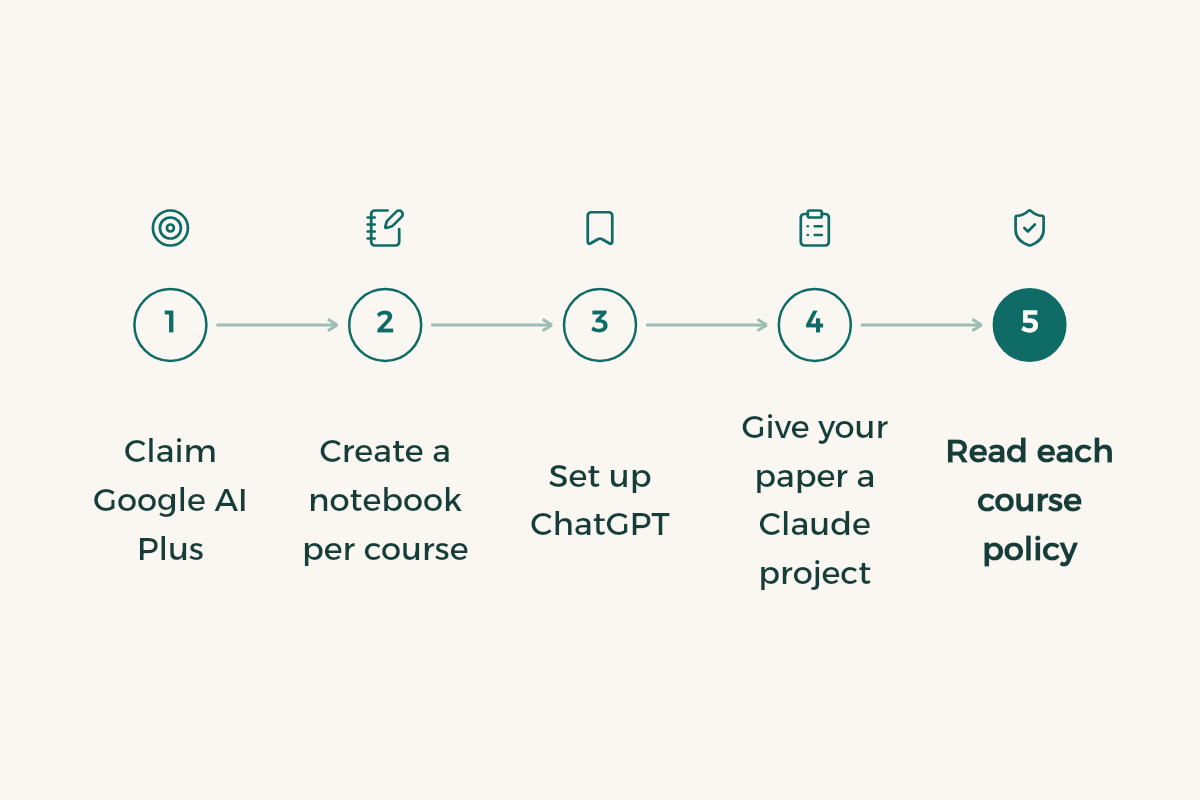
- Claim Google AI Plus
At gemini.google/students, on your personal Google account, with a payment method ready.4
- Create a notebook per course
In NotebookLM, upload the syllabus and the first two weeks of slides.
- Try study mode
In ChatGPT, type @study and ask it to quiz you on your first topic.
- Set up a project for your paper
If you have a paper or graduation project, give it a Claude project with its files and instructions.
- Read each course policy
Know what is allowed before you use any tool on graded work.
- Set a reminder
A week before the Google AI Plus year ends, so you can decide whether to keep it.
Which AI tools suit which major?
- Medicine, nursing and pharmacy: NotebookLM for long references, study mode for case questions.
- Engineering: ChatGPT or Claude for step-by-step problems, with every number checked on a calculator.
- Computer science: Claude for reviewing and explaining code, plus the GitHub Student Developer Pack.
- Business and accounting: Gamma or Canva for slides, Claude for case reports.
- Design and architecture: Canva, and more in design software for students.
What mistakes do students make with AI tools?
- Trusting a reference the tool names without opening it. Some are invented.
- Pasting answers into graded work. University rules are in AI and academic integrity.
- Sharing a university login or ID number in a chat.
- Buying a shared account from an online shop instead of using a free plan.
- Forgetting to cancel after a free year, so the price lands on your card.
- Collecting tools that overlap until your files are spread over five accounts.
If you are stuck between the big three, the detailed matchup is ChatGPT vs Claude vs Gemini, and what never to upload is in AI privacy for students.
I am a [year] student in [major] at a Saudi university. This term I am taking: [list].
Help me plan my study week: suggest a fixed slot for each course and a review method that suits each one (problem sets, flashcards, reading), and ask me for anything you need before you suggest.








Free software beyond AI is in free software for university students.