By the tiswa editorial team, from the official sources listed at the end of this guide. How we write our guides
How to use LinkedIn for job search is simpler than it looks, but it still needs a plan. Many students search every day and hear nothing, because they do not know the difference between a button that applies on the spot and one that sends them to another site, and they never set up alerts. Saudi job listings range from co-op and summer training to entry-level roles, and a good search starts with the right filters and the right words.
Before you search: prepare three things
- A complete profile with a clear photo and a headline that explains your major. If it is not ready, start with LinkedIn for students.
- A clear CV saved as a PDF. LinkedIn lets you upload a resume when you apply, and the steps are in its Help Center.
- A list of at least five search phrases that describe the opportunity you want in the words employers use.
The filters that matter to a student
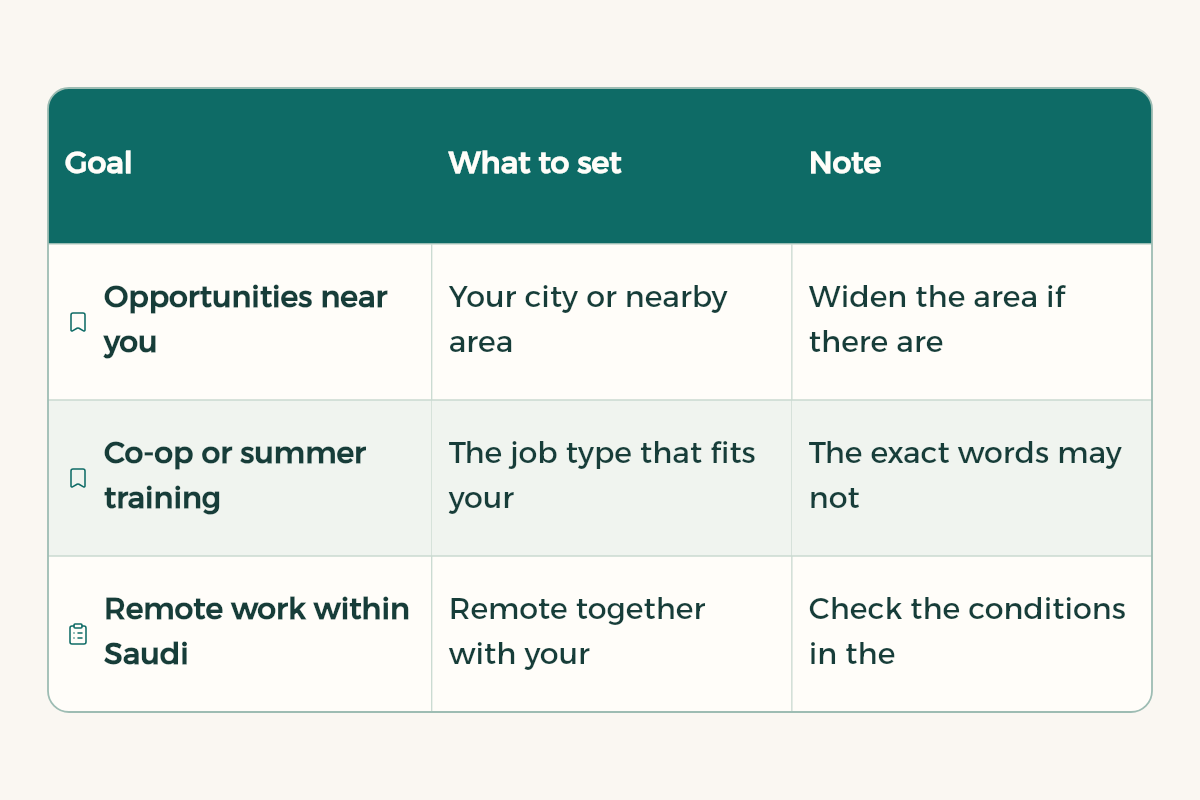
The jobs page has filters for location, job type, how you apply and other options. Names can vary a little between the app and the desktop site, but the idea is the same. This table shows what to set for each goal:
| Goal | What to set | Note |
|---|---|---|
| Opportunities near you | Your city or nearby area | Widen the area if there are few results |
| Co-op or summer training | The job type that fits your stage | The exact words may not appear in every advert |
| Remote work within Saudi Arabia | Remote together with your country | Check the conditions in the advert itself |
| Recent openings | Sort results by the newest first | Check new results first |
Easy Apply or Apply?
Job adverts show one of two buttons. Easy Apply means you apply through LinkedIn using your profile. Apply takes you to the company website or a third-party site to finish the application. LinkedIn has introduced limits on Easy Apply submissions to encourage thoughtful applications, so do not press the button on every advert without thinking.
- Read the description and choose the adverts that match two or three of your skills, then apply.
- If the advert asks for a CV, upload the version you wrote for this opportunity, not your general version.
- For Apply links, save the link and the wording you submitted, because you will need them before an interview.
Job alerts: let the search come to you
Alerts save you from searching every day. After a search, switch the job alerts toggle on, and new matches arrive daily by email and notifications by default. You can change this in Manage alerts, and you can have up to twenty job alerts at once.
- Run a clear search
Type a phrase such as "co-op training" and choose your city or remote, then open the results.
- Turn the alert on
On the results page, switch on job alerts. The label can differ between the app and the browser.
- Set frequency and channel
Start with email and notifications. Change the frequency only if the volume is too high for you.
- Review alerts every week
In Manage alerts, delete the ones that no longer help so the good matches are not buried.

Company alerts
If there are specific companies you would like to work for, open their LinkedIn page, go to the Jobs tab and create a job alert for that company. New openings from that employer reach you directly, without waiting to appear in your general search.
Keywords that suit training in Saudi Arabia
Adverts use different terms for the same kind of role. Try this list and adapt it to your field:
Co-op training [field]
Summer training [field]
Co-op [city]
Internship [field]
Graduate program [city]
Trainee [job title]
Large employers sometimes run graduate or trainee programmes with their own conditions. Read the full advert, because each organisation sets its own steps and you should not assume them.
Alongside LinkedIn, try Jadarat for public and private openings. The two platforms do not replace each other, so search both with the same keywords.
A weekly search plan
| Day | Task | Time needed |
|---|---|---|
| Sunday | Review new alerts and pick three suitable openings | Fifteen minutes |
| Tuesday | Tailor one CV to one opportunity | One hour |
| Thursday | Message one person in your field at a target company | Half an hour |
| Saturday | Check the openings you applied to and update their status | Fifteen minutes |
Common search mistakes
- Searching a single word such as "job". Results are generic and the openings that fit your stage stay hidden.
- Pressing Easy Apply on every advert without reading it, then wondering why nobody replies.
- Leaving alerts running without review, so your inbox fills with adverts you do not need.
- Ignoring your profile after you apply. Some employers read it before they reply.
When an interview invitation arrives, review job interview questions. If the role is a co-op placement, read the co-op training guide. Make sure your CV matches your profile, using the template in CV for students with no experience.
An example of a search that improves
A student in accounting in Jeddah typed co-op training accounting, chose her city, switched on the alert and opened three adverts to read them properly. After a week she noticed the word auditor appeared in adverts that suited her, so she added it to her list. The search improves over time, because each week the student learns new words from the adverts themselves.
If results are very few, do not assume the market is closed. Widen the keywords, then the area, then try remote work. Many openings use a job title that differs from the name of your degree, so look at the titles employers use in neighbouring adverts.
After you apply: how to follow up
Do not simply wait after you apply. Review the openings you applied to on LinkedIn, and check the status where it is shown. If a week or more passes without a reply, message someone at the same organisation with a short note that names the role and asks one clear question about the next step. A message that only asks whether your application arrived gives the reader little to act on.
Keep a simple tracker of the openings you applied to: the organisation, the title, the link to the advert, the date you applied and the version of the CV you sent. It saves a lot of time before an interview, because you will know what you wrote and why.
Hi [Name],
I applied on [date] for the [job title] role, and I wanted to check on the next step. I am [your name], a [major] student at [University], and I remain very interested in this opportunity.
Thank you for your time.