By the tiswa editorial team, from the official sources listed at the end of this guide. How we write our guides
Statistics course. Your team collected twenty survey responses, and the doctor wants the average satisfaction, the share who agree, and one chart. One teammate has an old laptop with no Excel installed. Another wants to type numbers from an iPad. This is where Excel in the browser earns its place: the file is one, and everyone opens it from wherever they are.
What is Excel online, and how does it differ from the installed app?
It is Excel for the web: you open it in a browser with a Microsoft account, your file is saved online, and others can edit it with you. Microsoft says it looks a lot like the desktop app, with differences it lists on a dedicated page.1 The ones that matter to a student: advanced analysis tools such as Power Pivot are desktop only, and creating external data connections needs the installed app.1
Do you need those in an ordinary coursework task? Usually not. A table, AVERAGE, COUNTIF and a column chart all run in the browser. If your information-systems course asks for an advanced data model, read the assignment first, then check the differences page before you commit to the browser.
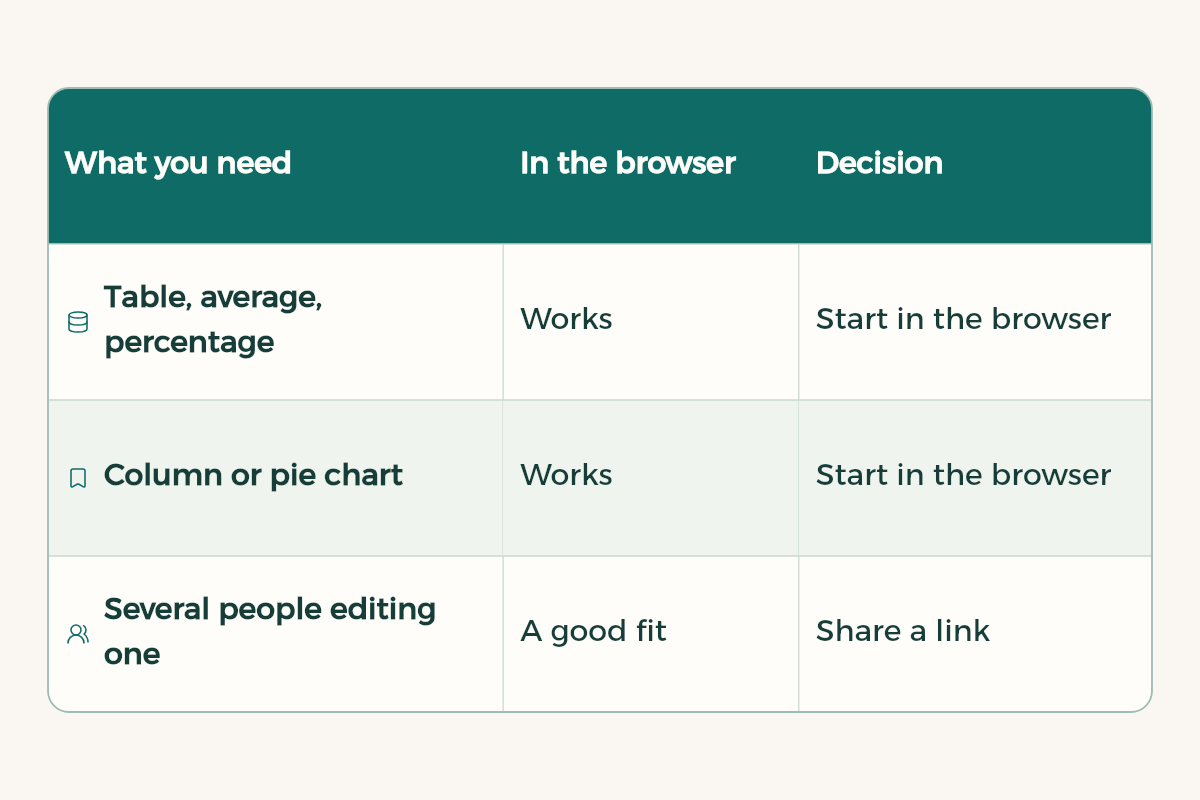
| What you need | In the browser | Decision |
|---|---|---|
| Table, average, percentage | Works | Start in the browser |
| Column or pie chart | Works | Start in the browser |
| Several people editing one file | A good fit | Share a link |
| Power Pivot or an advanced data model | Not available in the browser1 | Use installed Excel |
| Connection to an external data source | Creating one needs the app1 | Use installed Excel |
How do you start a task in Excel online?
The example below uses made-up numbers for teaching. It is not real survey data. Swap in your own responses.
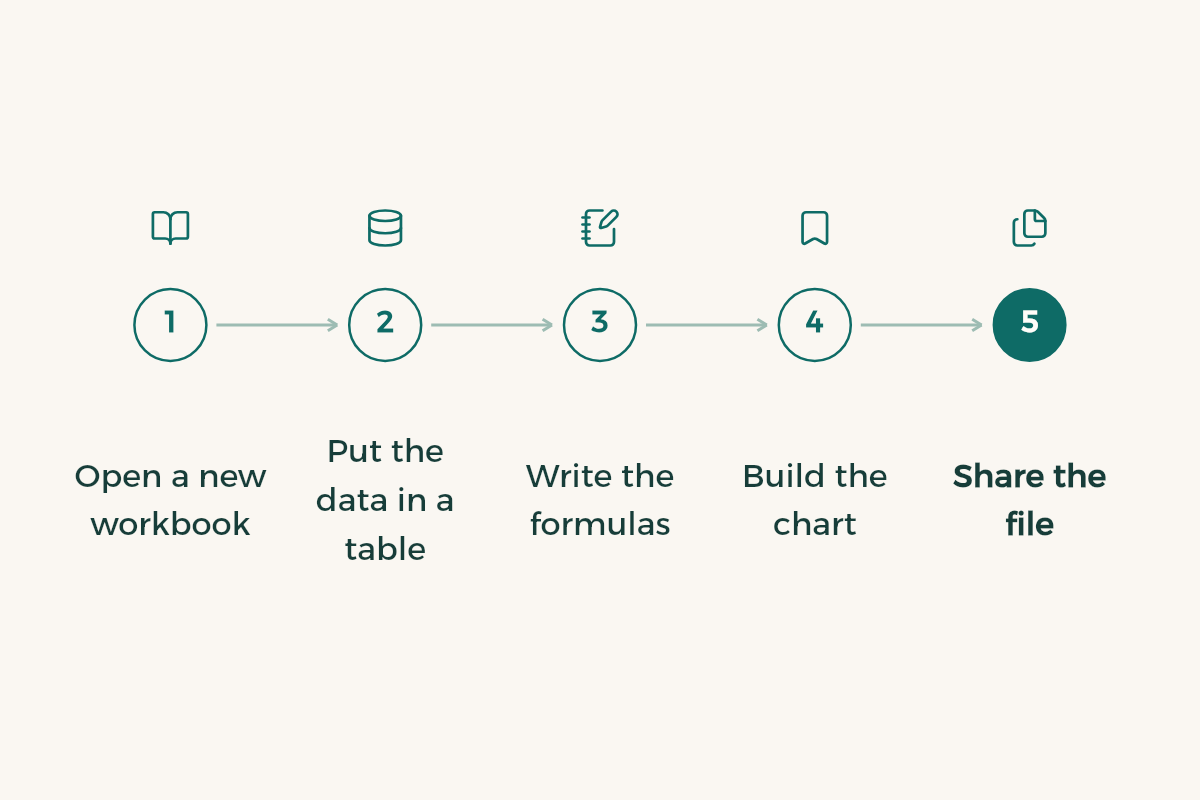
- Open a new workbook
Sign in with your Microsoft account in the browser and open Excel. If your university issues you an account, test the sign-in with its IT office rather than assuming it is switched on.
- Put the data in a table
Use row one for headings: participant number, satisfaction from 1 to 5, agrees (yes or no). Select the cells and choose Insert, then Table, so formulas follow the data when you add a row.
- Write the formulas
Below the table type =AVERAGE(B2:B21) for mean satisfaction. For the share who agree type =COUNTIF(C2:C21,"yes")/COUNTA(C2:C21), then format the cell as a percentage.
- Build the chart
Select the satisfaction column and insert a column chart. Give it a title that names the question and label both axes.
- Share the file
Press Share, choose who can edit, and drop the link in your team chat. Agree who types the numbers and who reviews.
How do you avoid the usual mistakes in a shared task?
Mistake one: numbers stored as text. When you paste data from a Google form or a message, Excel may treat the cells as text, so the average comes out zero or rows get skipped. A quick test: add =COUNT(B2:B21). If it returns fewer than your response count, some cells are text.
Mistake two is version drift, covered above. Mistake three: someone types a ready value over a formula. The sheet looks right, then stops updating when the data changes. Give one member ownership of the formulas and let the rest enter numbers only. For wider formula coverage see Excel formulas for students, and if your data is large, pivot tables may suit you better.
Is Excel online free?
It depends on the account, and Microsoft changes its plans, so we do not freeze a condition or a price here. Open the Excel site with your account and see what it offers you, and ask your university IT office whether students get an institutional account. For another browser-based option read the Google Sheets guide, where the file owner decides who edits and who only comments5, and for the basics Excel for students.
How do you hand the file to your doctor?
Read the submission instructions first. Some courses want an Excel file, others want the chart pasted into a Word report. Download a copy for submission, then open it once more on a device that is not yours to confirm the numbers and the chart show up. If the report is in Word, Word for students helps you place the table cleanly.
One chart rule: include only what answers the assignment question. A pie chart of five satisfaction scores gives near-equal slices that are hard to read, and bars are clearer. Put the values on the bars if the doctor will read a printout.
How should the team split the work inside one file?
Split the workbook into two sheets before anyone types: a Data sheet where people enter numbers only, and a Results sheet holding the formulas and the chart. Three members can then enter their responses at the same time without anyone touching a formula. Put one line at the top of the Data sheet saying who enters what and how many responses to expect, so a missing row shows up fast.
Most Saudi universities collect coursework through Blackboard, so a share link alone may not count as a submission if your doctor asks for an uploaded file. Upload the downloaded copy and keep the link for editing among yourselves. If a teammate runs late, give them comment access instead of edit access, so they cannot change a working sheet an hour before the deadline.
Last, agree on one fixed file name such as “Statistics task, final”, and do not append a new number each time. One file with one name is easier on everyone than a chain of “final”, “final2” and “final-last”.