By the tiswa editorial team, from the official sources listed at the end of this guide. How we write our guides
An AI CV writer takes on the hardest part for a student: turning experience that feels small, such as a graduation project, volunteering with a club or a summer internship, into clear, convincing bullet points. But the tool does not know you. Give it general information and it gives you a general CV that looks like thousands of others, and sometimes it adds skills and achievements you never had, which is the most dangerous mistake you can make.
This guide builds a student or new graduate CV step by step: you collect the raw material yourself, the tool helps with wording and order, then you format it and review it through an employer's eyes.
The role of AI in your CV: an editor, not an author
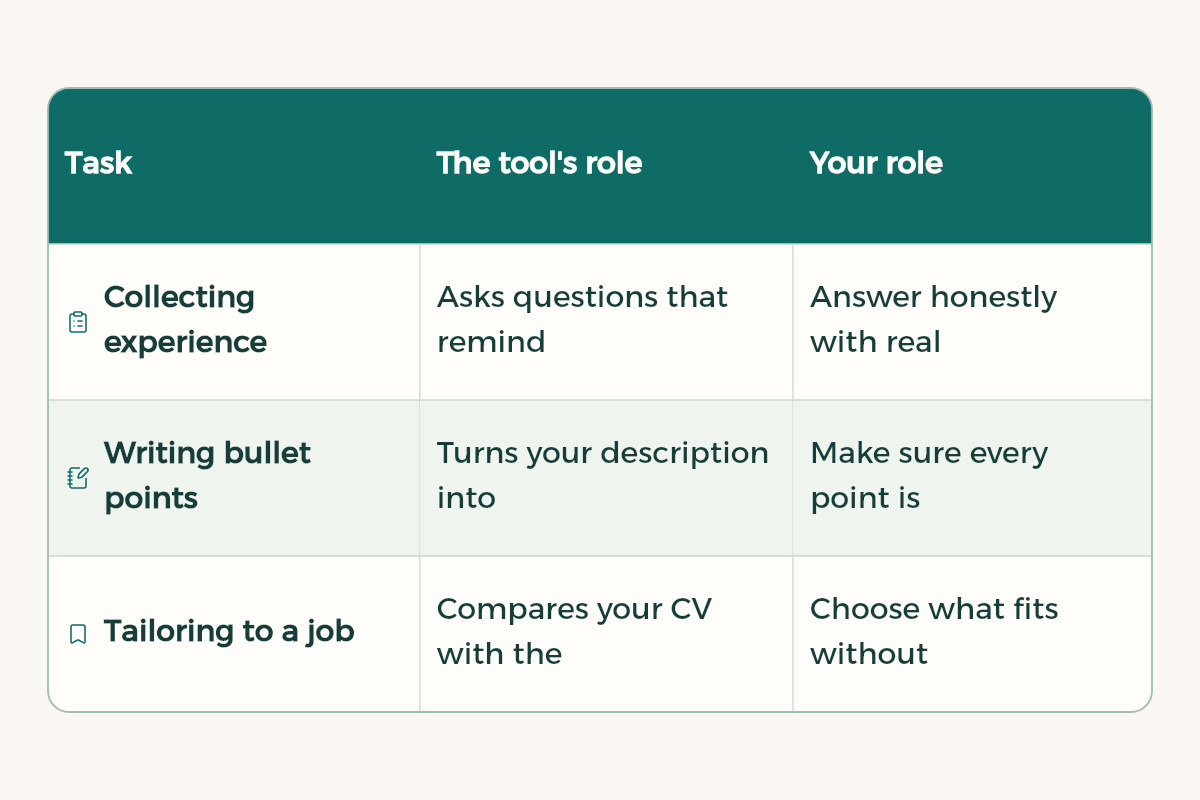
| Task | The tool's role | Your role |
|---|---|---|
| Collecting experience | Asks questions that remind you of things you forgot | Answer honestly with real numbers |
| Writing bullet points | Turns your description into short lines that start with a verb | Make sure every point is true |
| Tailoring to a job | Compares your CV with the job advert | Choose what fits without inventing |
| Proofreading | Fixes mistakes and keeps the style consistent | Review the final version |
| Formatting | Canva or Word templates | Pick a simple, clear design |
Step one: the raw material comes from you
Before you open any tool, write everything in one file: key courses and their projects, your graduation project, co-op or summer training, volunteering, student clubs, courses and certificates, technical skills and languages. Do not worry about wording yet. What matters is the real detail: what you did, with which tool, and what the result was.
I am a [fourth-year] [information systems] student writing a CV for a [data analysis co-op placement].
Ask me questions one at a time about my university work, volunteering, projects and training, to help me remember achievements I may have forgotten.
After each answer, ask for details: the tool I used, my exact role, and the result.
Do not suggest achievements of your own.
Step two: writing the bullet points
A strong CV bullet starts with an action verb, says what you did and how, then the result. Instead of "Member of the programming club", write "Organised two Python basics workshops attended by [real number] students". Tools are excellent at this conversion if you give them the details.
Turn the description below into two or three CV bullet points in [English].
Each bullet starts with an action verb and states what I did, the tool, and the result.
Use only the information given. Do not add numbers or skills that are not there.
If a bullet needs a number, write [number] and leave it for me.

Description: [In our graduation project we analysed student attendance data in Excel and Power BI and built a dashboard showing absence rates for each course. I was responsible for cleaning the data.]
Step three: tailor the CV to each job
One CV for every opportunity is weaker than a tailored one. Copy the job or internship advert and ask the tool to compare it with your CV. The goal is to bring forward the experience that fits the advert and use the same terms where they describe something you really did, not to add skills you do not have.
Here is a [co-op placement] advert:
[Paste the advert]

Here is my CV:
[Paste your CV]

1. What are the five most important skills or requirements in the advert?
2. Which of them appear in my CV, and in which bullet?
3. Which bullets deserve to move up or be reworded to fit the advert?
4. Which requirements do I have no evidence for? Do not add them to the CV, just list them for me.
Step four: formatting
Canva's official resume page offers thousands of templates in categories including Academic, College, Minimalist and Professional, as well as templates labelled ATS. You can export your CV as PDF, JPEG or PNG, or send a view link to an employer. For a student, a simple one-column template with a clear font, exported as PDF, works best. More in our Canva guide for students.
- One page is enough for most students and new graduates.
- Put education first if your work experience is short, then projects and training.
- Leave out a photo unless the advert asks for one or it is normal in the field.
- Give the file a clear name: first name, last name and CV.
Privacy: do not give the tool everything
A CV holds personal data. Before you paste it into any tool, remove your ID number, full address and phone number, and replace them with placeholders such as [phone]. In ChatGPT you can turn off the option to improve the model for everyone under Data controls, or use a temporary chat. Details in AI privacy for students.
Mistakes that give away an AI-written CV
- Repeated generic phrases like "passionate", "dynamic" and "team player" with no evidence.
- Skills you do not really have, which come out in the first interview question.
- Invented or inflated numbers.
- A different style in each section because each part came from a different chat.
- An English CV with literal translation mistakes. See AI translation Arabic English for how to review it.
After the CV: cover letter and interview
The same approach works for a cover letter: give the tool the advert, your CV and a real reason you are interested in the organisation, and ask for a short draft that you then rewrite in your own voice. For the interview, ask it to put likely questions to you one at a time and give feedback on your answers. For sharper prompts in any of these tasks, see prompt writing basics.
I am applying for a [data analysis co-op placement] and here is my CV:
[Paste your CV]
Act as an interviewer. Ask me one question at a time about the experience on my CV, wait for my answer, then give me short feedback: what was strong and what was missing.
After five questions, summarise the two points I should improve most.
- Canva: Canva offers Canva Pro free through Canva for Campus to university students in Saudi Arabia.
- Notion: Notion offers Notion Education plan for students to university students in Saudi Arabia for free.
- Google AI: Google AI offers Google AI Plus free for a year to university students in Saudi Arabia.