By the tiswa editorial team, from the official sources listed at the end of this guide. How we write our guides
Your training supervisor hands you a file with eight hundred journal rows and says: I need the total for each account before noon. You start adding cells one by one on a calculator. An hour later you finish, and then the supervisor finds that one row was added afterwards, so you redo everything. Someone who knows SUMIF finishes in two minutes, and repeats it in a second.
Which Excel skills does an accounting student need?
Six skills get used every week in accounting offices, and you can learn all six in a month if you practise on one dataset. First, SUMIF and SUMIFS add the values that meet a condition, such as the total debits of the cash account.1 Second, XLOOKUP finds an account or invoice number in another table and returns its name or value.2 Third, the PivotTable condenses hundreds of entries into a small table you rearrange by dragging.3
The other three are simpler and matter more than you would expect. ROUND, because tiny fraction differences show up as phantom errors in a trial balance. Absolute references, the dollar sign before a column or row, because copying a formula without them shifts the reference and ruins the result. And data validation, to stop text being typed into an amount cell. If you want the general Excel functions first, read Excel for students and Excel formulas.
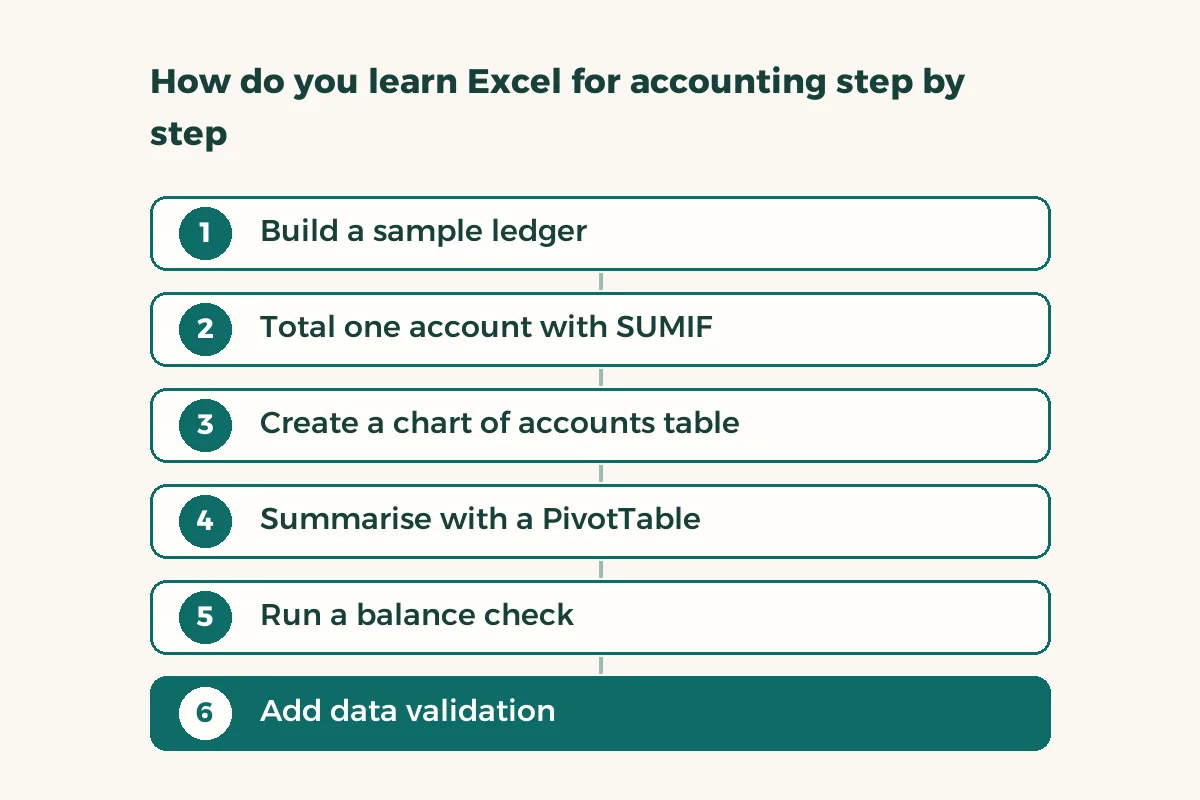
How do you learn Excel for accounting step by step?
- Build a sample ledger
Thirty invented entries in four columns: date, account number, debit and credit. Put “sample” in the file name so it never mixes with a real file.
- Total one account with SUMIF
In a side cell type an account number, and beside it the SUMIF of its debits. Change the account number and watch the result move.
- Create a chart of accounts table
A second sheet with account number, name and type. Then let XLOOKUP pull the account name next to every entry.
- Summarise with a PivotTable
Select all the data, insert a PivotTable, put account in rows and debit and credit in values.
- Run a balance check
In a cell at the top: total debits minus total credits inside ROUND. It must show zero, or an entry is wrong.
- Add data validation
Make both amount columns accept numbers only, and make the account column accept only what is on the chart of accounts.
What is the difference between SUMIF, XLOOKUP and a PivotTable, and when do you use each?
| Tool | Answers | Sample use |
|---|---|---|
| SUMIF / SUMIFS | What is the total where the condition is true? | Total debits of the administrative expenses account |
| XLOOKUP | What value matches this number? | The name for account 1101 from the chart of accounts |
| PivotTable | How do the numbers spread across categories? | Debit and credit for each account and month |
| ROUND | How do I drop fractions that mean nothing? | Round a total to two decimals |
| Data validation | How do I block mistakes at entry? | Accept numbers only in the amount column |
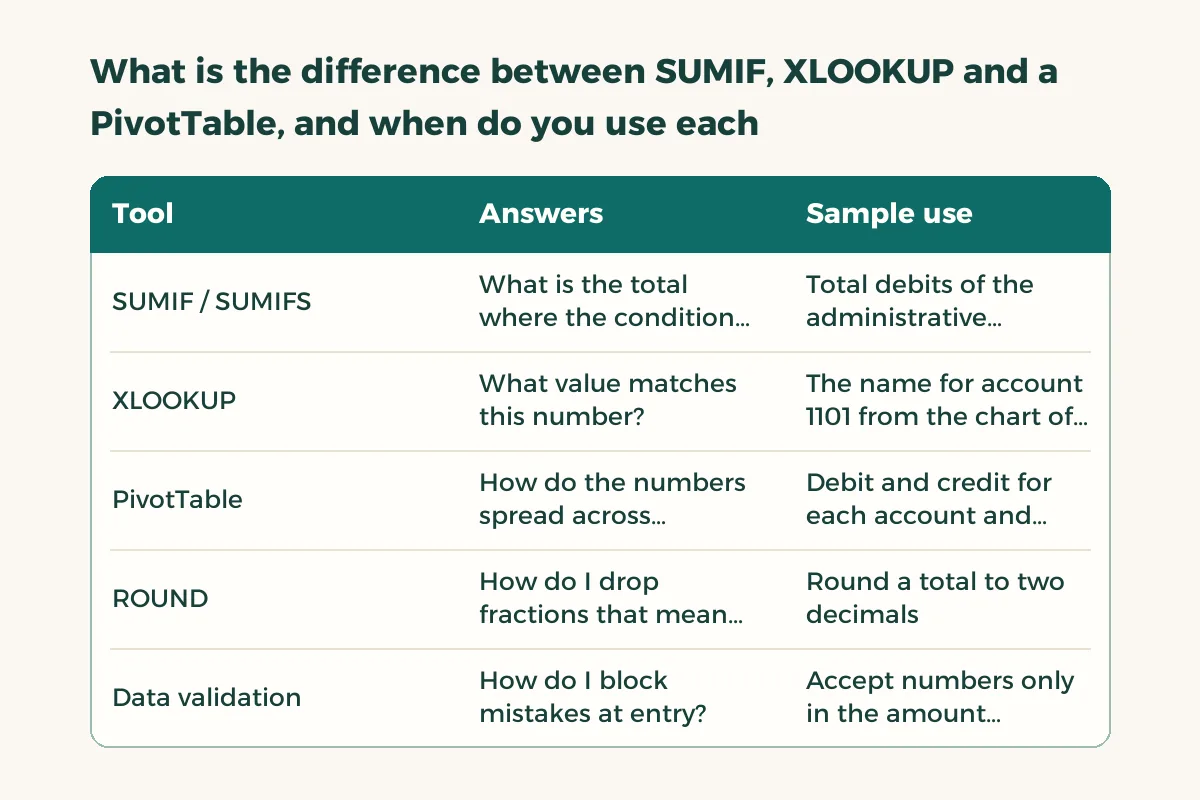
The rule for choosing: if you want one number use SUMIF, if you want a distribution use a PivotTable, and if you are linking two tables use XLOOKUP. For XLOOKUP against the older VLOOKUP see VLOOKUP vs XLOOKUP, and for hands-on PivotTable detail see pivot tables in Excel.
How do you check that your accounting spreadsheet is correct?
Three checks before you hand anything in, and they take five minutes. The first is the balance check: total debits equal total credits. The second is the duplicate check: does an entry or invoice number appear twice? Use conditional formatting to colour repeats. The third is the range check: is there a negative or oversized value you did not expect? Sort the column in descending order and look at the first and last ten rows.
If your figure differs from your supervisor’s, do not defend your file first. Ask for the number they got and compare row by row until you find the first difference. Most often the cause is a range that missed the new rows, a reference that was not locked, or a number typed as text. Learn this tracing habit, because it is the real accountant’s skill.
Before training starts, try this test on yourself: open your sample file a week after leaving it, and try to explain each sheet to a classmate in two minutes. If you have to remember, the file needs clearer names and a note at the top of each sheet. A supervisor in a Riyadh or Jeddah office will open your file and you will not be standing next to them. A clear file speaks for you.
Give it thirty minutes a day. Not four hours on Friday. Functions stick through short repetition, and within two weeks you will type SUMIF without looking at an example.
What Excel mistakes cost an accounting trainee?
The first is merging cells in a data table, which breaks sorting and the PivotTable. The second is typing numbers directly into a formula instead of pointing at a cell, which makes it hard to trace. The third is leaving sheets and columns unnamed. The fourth is sending a file whose formulas point at another file on your laptop, so your supervisor sees reference errors. Keep a values-only copy for handing in and the formula copy for yourself.
And do not put real client data on your personal laptop or into an outside AI tool without the supervisor’s permission. Practise on your sample data, and when you do real work follow the host’s policy. For the other accounting software you will meet after Excel read software for accounting students, and for the wider co-op skill set read co-op training skills in accounting.
Do you need an Excel certificate to be accepted for training?
Usually not. A supervisor tests what you do in front of them: total with a condition, fetch with a lookup, summarise with a PivotTable. A certificate without that ability does not help, and the ability without a certificate is enough. Put what you built on your resume, such as “built a sample ledger with an automatic balance check”. To explore the body that regulates the profession, see the Saudi Organization for Certified Public Accountants.4