By the tiswa editorial team, from the official sources listed at the end of this guide. How we write our guides
Learning SQL is one of the fastest-paying technical skills for a student: a short language whose basics take weeks, and that you need in computer science, information systems, data analysis, business and even research. Every app you use stores its data in a database, and SQL is how you ask that database questions. In this guide you build a small students table on your computer, write the core queries with real examples, then follow a six-week practice plan.
What is SQL and why does everyone ask for it?
SQL stands for Structured Query Language, a language for working with relational databases: data lives in tables, each table has columns and rows, and tables link to each other. Systems such as PostgreSQL, MySQL, SQLite and SQL Server all understand SQL, with small differences in the details. What you learn on one system carries over to the rest.
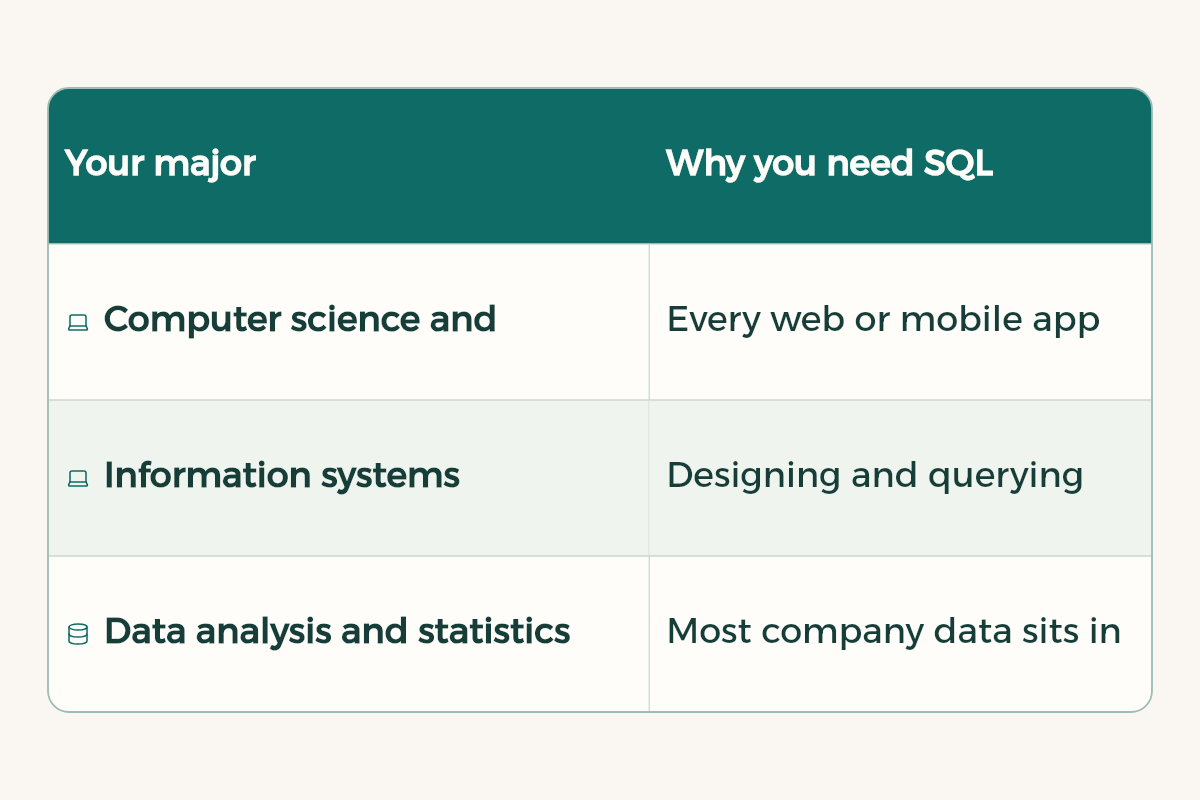
| Your major | Why you need SQL |
|---|---|
| Computer science and software engineering | Every web or mobile app needs a database, and your graduation project likely does too |
| Information systems | Designing and querying databases is a core part of the courses |
| Data analysis and statistics | Most company data sits in databases, and SQL is the first tool to pull it |
| Business, finance and marketing | Sales and customer reports start with a query, and knowing it saves you waiting on others |
Set up in five minutes
The easiest start is SQLite. According to its official site, it is a complete database library in a single file with no server and no configuration. Install a free tool that opens SQLite files, or use the sqlite3 command line, and create a new file. Then paste this code to build a small students table:
CREATE TABLE students (
  id INTEGER PRIMARY KEY,
  name TEXT NOT NULL,
  major TEXT,
  gpa REAL,
  city TEXT
);

INSERT INTO students (name, major, gpa, city) VALUES
  ('Sara', 'Computer Science', 4.6, 'Jeddah'),
  ('Faisal', 'Accounting', 3.9, 'Riyadh'),
  ('Noura', 'Computer Science', 4.1, 'Riyadh'),
  ('Omar', 'Nursing', 4.8, 'Jeddah'),
('Lama', 'Accounting', 3.2, 'Dammam');The core queries
These queries cover most of what you will write in your first month. Run each one and predict the result before you see it, because that is the fastest way to understand the language:
-- every student
SELECT * FROM students;

-- computer science students only
SELECT name, gpa
FROM students
WHERE major = 'Computer Science';

-- highest GPAs first
SELECT name, gpa
FROM students
ORDER BY gpa DESC
LIMIT 3;
SELECT picks the columns, FROM picks the table, WHERE filters the rows, ORDER BY sorts and LIMIT sets how many. You can combine conditions with AND and OR, and use LIKE to search text.
-- average GPA and number of students per major
SELECT major,
       COUNT(*) AS students,
       ROUND(AVG(gpa), 2) AS avg_gpa
FROM students
GROUP BY major
HAVING COUNT(*) >= 2
ORDER BY avg_gpa DESC;
GROUP BY gathers similar rows, and functions such as COUNT, AVG, SUM and MAX compute over each group. The key difference: WHERE filters rows before grouping, and HAVING filters groups after it.
Linking tables with JOIN
In a real database you do not put everything in one table. Students go in one table, courses in another, and enrolments in a third that links them. This is where JOIN shows its power:
CREATE TABLE enrollments (
  student_id INTEGER REFERENCES students(id),
  course TEXT,
  grade INTEGER
);

INSERT INTO enrollments VALUES
  (1, 'Databases', 95), (1, 'Algorithms', 88),
  (3, 'Databases', 79), (4, 'Anatomy', 97);

SELECT s.name, e.course, e.grade
FROM students s
JOIN enrollments e ON e.student_id = s.id
WHERE e.course = 'Databases';
A plain JOIN returns only rows that match in both tables. A LEFT JOIN returns every student, even those with no enrolment, and their enrolment columns show as empty (NULL). Try both and compare.
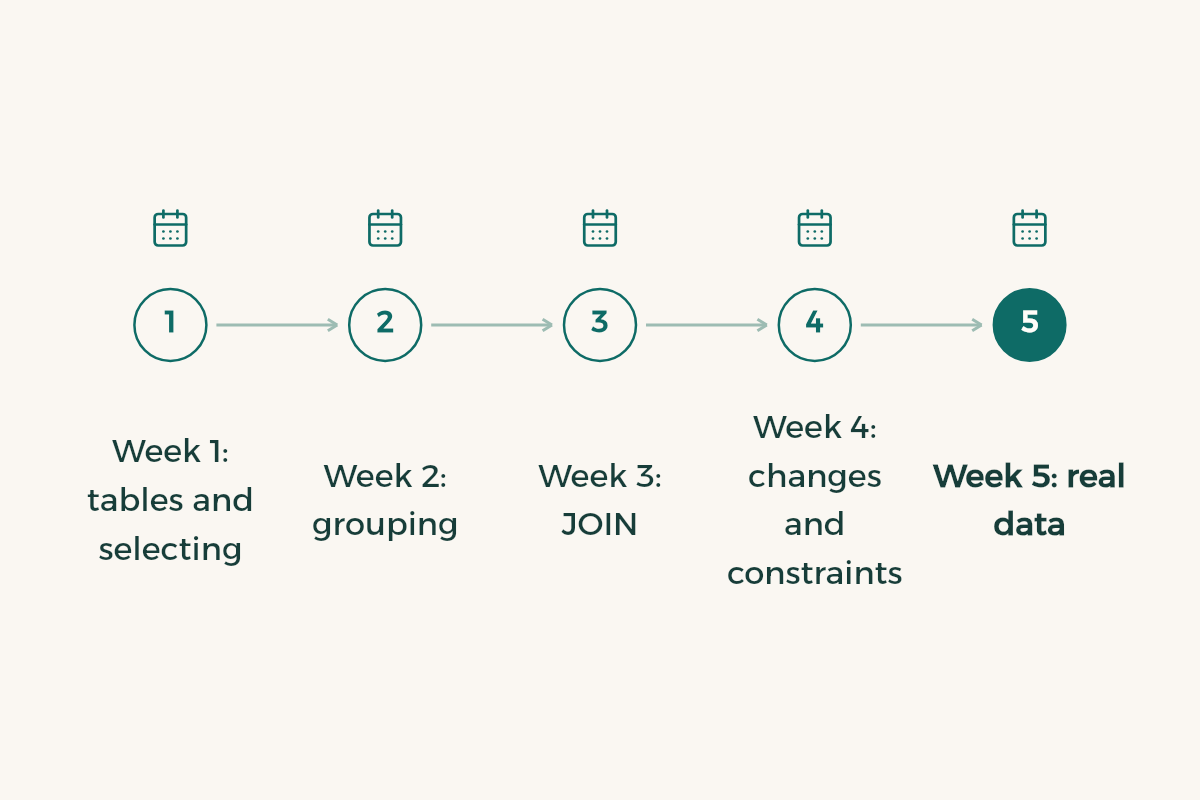
A six-week plan
- Week 1: tables and selecting
CREATE TABLE, INSERT, SELECT, WHERE and ORDER BY on the students table. Write twenty queries yourself.
- Week 2: grouping
COUNT, AVG, SUM, GROUP BY and HAVING. Ask questions about your data: which city has the highest average?
- Week 3: JOIN
Design three linked tables for a topic you know, such as a library or a small shop, and write queries that join them.
- Week 4: changes and constraints
UPDATE, DELETE, primary and foreign keys and NOT NULL. Learn why you need WHERE before any DELETE.
- Week 5: real data
Finish the free Kaggle Intro to SQL course, which gives a completion certificate and uses real datasets.
- Week 6: a small project
Design a database for an app you like, write ten queries that answer useful questions, and push it to GitHub with a README.
Free official sources
- The SQLite SQL language docs: a reference for every command with examples and diagrams.
- The PostgreSQL tutorial: explains tables, queries and joins clearly, and suits you when you move to a server database.
- Kaggle Intro to SQL, then Advanced SQL: two free courses with hands-on exercises and a completion certificate.
- JetBrains tools are free for students and include database tools. Find them in free software for students.
Let AI coach you
Instead of letting it write the query, ask it for exercises on your table and to correct your attempts. Try this with ChatGPT or Gemini:
I am learning SQL. Here is my table: students(id, name, major, gpa, city) and enrollments(student_id, course, grade). Give me 5 practice questions in plain English, from easy to hard, one at a time. Wait for my query, then tell me if it is correct, show the result it would return, and explain any mistake without rewriting the whole query.
Common mistakes
- Running DELETE or UPDATE without WHERE, which changes every row. Write a SELECT with the same condition first and check the result.
- Using = to compare with NULL. The correct form is IS NULL or IS NOT NULL.
- Putting a condition on a COUNT result in WHERE instead of HAVING.
- Using SELECT * in every query. Pick only the columns you need.
- Keeping all data in one huge table instead of splitting it into linked tables.
SQL is the first step in the data analysis roadmap, and you need it with JavaScript when you build an app that stores user data. If you study computer science, also read AI for computer science students.