By the tiswa editorial team, from the official sources listed at the end of this guide. How we write our guides
At the first chemistry lab the instructor hands you absorbance readings for five solutions and wants a report in a week. You search “chemistry programs” on your phone and get apps that simulate experiments, revision platforms and paid software nobody asked for. This is an example, but it shows why students download first and ask later.
What do chemistry programs mean: a degree or software?
The phrase carries two meanings. One is a degree programme: a bachelor’s in chemistry, applied chemistry or industrial chemistry, taught by a college of science. The other is the tools you open on your laptop to draw compounds, process results and write the report. We start with the first, because it is the more expensive decision.
What should you ask a college before enrolling in a chemistry programme?
Knowing the major is called chemistry is not enough, because plans differ: general, applied, industrial, biochemistry. Ask for the written plan, count the lab courses in it and note when the lab starts. For a picture of the first year read our first-year chemistry plan and the chemistry major guide.
- Ask for the study plan
From the college site or the deanship of admission and registration. Count lab courses and their prerequisites.
- Ask about tracks
Does the programme branch after a year into applied, industrial or biochemistry? When must you choose?
- Ask about computer labs
Does the college provide molecule or spectra software in its lab? Do you need your own machine?
- Ask about the capstone
When is the topic chosen? To prepare, read the chemistry capstone scope guide.
- Ask about co-op
Is there co-op training? Then read chemistry co-op skills and evidence.

These are questions for the college, not facts about your university. If the plan is not published, write to the department and keep the reply.
Which chemistry programs does a student need for coursework?
Three tools cover most of year one, and all are simpler than you think: a database to look up a compound, a program to draw its structure and a spreadsheet to analyse readings. PubChem describes itself as an open chemistry database run by the US National Library of Medicine,1 and NIST’s online book publishes thermochemical data for a very large set of substances.2 Avogadro is an open-source molecule editor.3
| Need | Usually enough | Move on when |
|---|---|---|
| Looking up a compound | An open scientific database | The lecturer names a specific reference |
| Drawing a structure | A free molecule editor | The course demands a particular file format |
| Lab readings | Excel and a tidy sheet | An advanced course asks for a statistics package |
| Simulating an experiment | Whatever the department provides | A lab is unavailable and the lecturer approves a substitute |
| Writing equations | The equation editor in your word processor | The supervisor sets a template |
The table is a way of thinking. What your lecturer requires is the reference.
How do you analyse lab readings in Excel in an hour?
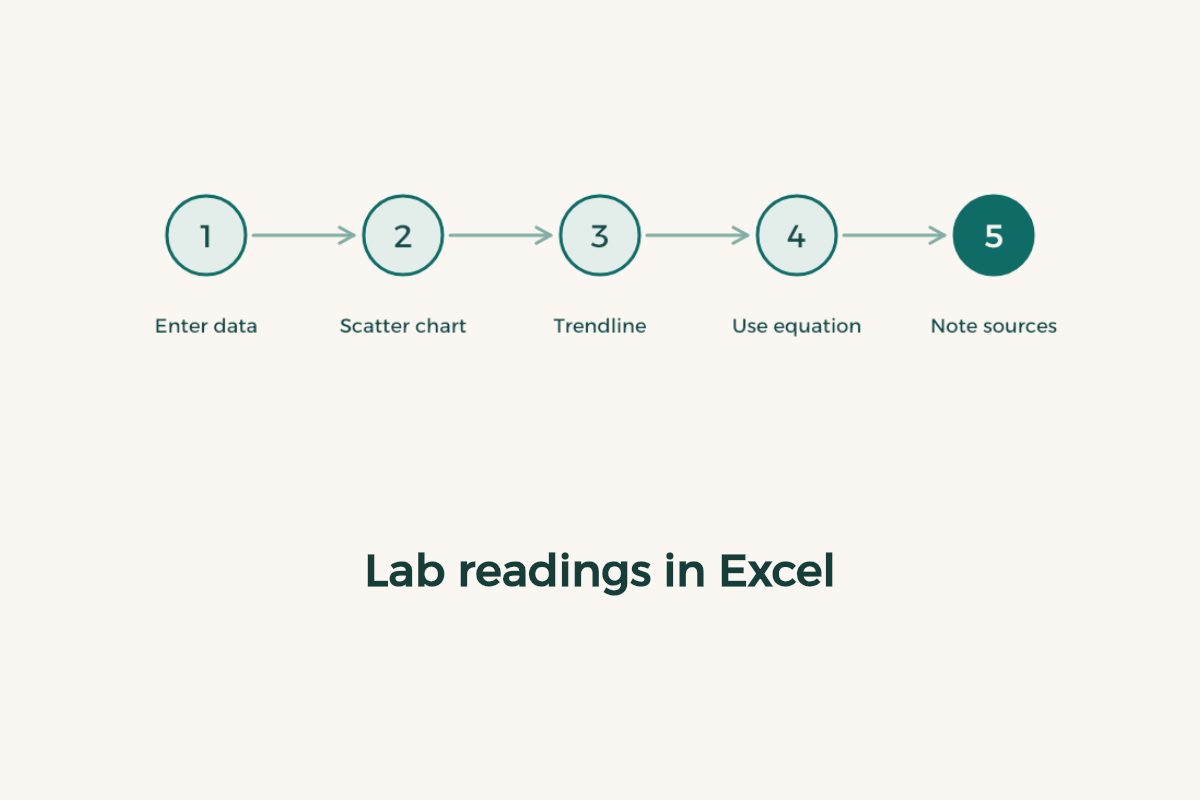
This exercise uses made-up numbers, not real results. Say you measured the absorbance of five solutions of known concentration. Put concentration in one column and absorbance in another, draw a scatter chart and add a trendline. Microsoft’s guide walks through building a chart from start to finish.4
- Enter data as measured
Do not round while typing, and put the unit in the heading.
- Draw a scatter chart
Concentration on the x axis, absorbance on the y axis.
- Add a trendline with its equation
Show the equation and the R-squared value on the chart.
- Use the equation on an unknown
Plug in the absorbance of an unknown solution and calculate its concentration.
- Write down your sources
The instrument, the solution and the reference for every constant you used.
What lab data do you record, and how do you keep it?
Students lose many report marks because they did not record enough in the lab itself. Write down the time of measurement, the stated temperature and the instrument reading as it appeared, not as you think it should be, and label every reading with the batch or solution name. Move the numbers to your sheet the same day, before you forget a unit or an order. Over a ten-week course one tidy file per experiment beats ten scattered ones, so name each file with the experiment number, the date and a version letter.
Add a line to each file about any slip you made or noticed: a spill, a short wait, a late calibration. That line separates a report whose author knows what happened from one copied off the lab manual, and markers value the honesty.
What mistakes do students make with chemistry programs?
The first is installing heavy simulation software before the course asks. The second is copying a classmate’s sheet without understanding it, which shows up at the first oral question. The third is leaning on a problem-solver app that gives answers without steps; read the rules on AI and academic integrity first. The fourth is keeping lab data on one machine, so make a copy as in the backup guide.
How do you study chemistry with software without wasting time?
Use the tool after you solve, not before. Draw the molecule by hand, then compare it with the editor. Work out the concentration with a pencil, then check it in Excel. The tool becomes a checker rather than a substitute for understanding. For lab-course habits read studying between lab sessions.